PhantomBuster Review: Is It Worth It in 2026?
This PhantomBuster review looks at what the tool does well, where it falls short for LinkedIn outreach, and what it costs in 2026. PhantomBuster is a cloud automation platform: it runs a real browser on its servers, uses your logged-in session to collect data you can already see, and chains small automations into workflows that feed a spreadsheet or CRM.
It is a data and workflow tool first and an outreach tool second. That distinction decides whether it is right for you. Facts below come from PhantomBuster's own blog guides and pricing explainer, which we read on October 2, 2026. Its pricing page itself did not load plan details for us, so we link to it for the latest numbers.
PhantomBuster is a strong cloud tool for pulling LinkedIn and web data into a sheet or CRM, but it is a kit of parts for outreach: no single sequence, no shared inbox and pricing by execution hours. Pick it for data workflows. For LinkedIn and email outreach in one place, Hollerly (from $19 a month) is the simpler fit, with Waalaxy and Dripify as other options.
PhantomBuster review: verdict at a glance
| PhantomBuster | |
|---|---|
| Best for | Growth and ops people who want LinkedIn and web data flowing into a sheet or CRM |
| Price | Free plan; paid plans $69, $159 and $439 a month, or $56, $128 and $352 a month billed annually |
| Free trial | 14 days, no credit card, 2 run hours and a 10-row export cap |
| Our take | Excellent data toolkit; outreach has to be assembled from separate automations and replies handled elsewhere |
If you only read one paragraph: PhantomBuster is very good at extraction and enrichment, and it keeps running with your computer off. As a complete LinkedIn outreach tool it asks more of you than most alternatives, because you build the flow, watch the hours and handle replies in another app.
Why listen to us?
We build Hollerly, a LinkedIn and email outreach tool, so we are a competitor and you should read this with that in mind. We did not run paid campaigns in PhantomBuster for this review. We read PhantomBuster's own pricing explainer, setup guide and product overview on October 2, 2026, quote figures only from those pages, and say plainly where PhantomBuster is stronger than Hollerly. Where a detail was not on those pages, we say so instead of guessing.
What is PhantomBuster?
PhantomBuster describes itself as cloud-based workflow automation for prospecting. It runs a real browser in the cloud, signs in with your session, and automates repetitive work such as exporting search results, visiting profiles and sending connection requests.
Its building blocks are called Phantoms. A Phantom is a single automation that does one task. A Flow chains several automations together, for example a search export, then a profile scraper, then an auto connect step. PhantomBuster works on LinkedIn, Sales Navigator, Google Maps and similar sites where you can see the data while logged in. It does not keep its own B2B contact database.
Results go out as CSV files, to Google Sheets, or to CRMs including HubSpot, Salesforce and Pipedrive. Its developer documentation also lists an API, webhooks and an MCP server for AI tools.
PhantomBuster LinkedIn automation
For PhantomBuster LinkedIn automation, you pick an automation, give it an input such as a search URL or a list of profiles, and schedule it. Separate automations handle exporting searches, scraping profiles, sending connection requests and other actions. You connect them into a Flow yourself.
Flows built from single-task automations
PhantomBuster's setup guide describes a standard three-step Flow: LinkedIn Search Export finds and exports profiles, LinkedIn Profile Scraper visits each one for extra fields, and LinkedIn Auto Connect sends connection requests with a personalized note. The guide's advice is to get extraction stable first and add outreach only once the same Flow runs consistently without session issues.
Cloud execution
Because the browser runs on PhantomBuster's servers, you can close your own browser after setup and your launches keep running. That is a real advantage over extension-only tools.
AI credits
Paid plans include AI credits. PhantomBuster says AI-powered automations use them and that usage varies with the prompt, the amount of data processed and the model you choose. The explainer does not list which LinkedIn steps use AI.
Where outreach gets harder
The flexibility is the appeal: you can build almost any LinkedIn data workflow without code. The downside is that outreach is assembled from parts. We did not find a single sequence where a reply stops follow-ups, a shared inbox or reply tagging on the pages we read, so most teams pair PhantomBuster with a separate outreach tool or CRM.
PhantomBuster LinkedIn setup: session cookie and cloud browser
To use PhantomBuster on LinkedIn, you connect your LinkedIn session, the token your browser uses to remember you are logged in. PhantomBuster's setup guide recommends its browser extension, which adds a "Connect to LinkedIn" button and fills in the session token for you. You can also copy it by hand, but the guide says the extension reduces mistakes and makes reconnecting faster when LinkedIn asks you to sign in again.
That last point matters in practice. Sessions expire, and when they do, automations stop until you reconnect. Plan a quick weekly check of your PhantomBuster LinkedIn connection if your Flows run on a schedule.
PhantomBuster LinkedIn profile scraper
The PhantomBuster LinkedIn profile scraper is one of its best-known automations. In the setup guide it is step two of a Flow: a search export produces profile URLs, and the profile scraper visits each one to pull extra fields such as job and company details into your sheet or CRM.
| Account type | First run | Week 1 | After ramp-up |
|---|---|---|---|
| Standard LinkedIn | 10 profiles | 20 profiles | 60 to 80 profiles a day |
| Sales Navigator | 10 profiles | 30 profiles | 100 to 150 profiles a day |
The guide stresses gradual ramps over sudden jumps. If you need a list of several thousand profiles, plan for it to take days or weeks, not minutes. If you only need the list to start outreach, Hollerly imports leads straight from a LinkedIn search, Sales Navigator search or post URL, so a separate scraping step is not needed.
PhantomBuster pricing
| Plan | Monthly | Annual (per month) | Execution hours | Slots | AI credits | Email credits |
|---|---|---|---|---|---|---|
| Free | $0 | $0 | 30 minutes | 1 | None | None |
| Start | $69 | $56 | 20 | 5 | 10,000 | 500 |
| Grow | $159 | $128 | 80 | 15 | 30,000 | 2,500 |
| Scale | $439 | $352 | 300 | 50 | 90,000 | 10,000 |
You pay for the time your automations run, not per seat or per contact. That is fair for light use, but execution hours are hard to predict before you run real Flows, and slots cap how many automations you can keep set up at once.
PhantomBuster free plan: LinkedIn automation limits
The PhantomBuster free plan gives you 30 minutes of execution a month, one slot and 50 MB of storage, with no AI or email credits and exports limited to 10 rows. That is enough to test a single LinkedIn automation, not to run one.
The 14-day trial
The trial needs no credit card and includes 2 run hours, 5 slots, 1,000 AI credits, 50 email credits and 1 GB of storage, with the same 10-row cap on downloads. Use it to time one real Flow, then multiply out to a month to see which plan you need.
For comparison, Hollerly is $19 a month flat for LinkedIn outreach, or $49 with email steps. See Hollerly pricing.
PhantomBuster pros and cons
- ✓Wide library of automations for LinkedIn, Sales Navigator, Google Maps and other sites.
- ✓Runs in a cloud browser, so Flows continue with your computer off.
- ✓Exports to CSV, Google Sheets, HubSpot, Salesforce and Pipedrive.
- ✓Free plan and a 14-day trial with no card required.
- ✓API, webhooks and an MCP server for technical teams.
- ✕Outreach is built from separate automations, not one sequence.
- ✕No shared inbox or reply handling on the pages we read.
- ✕Execution hours are hard to predict before you run real Flows.
- ✕Free plan and trial exports are capped at 10 rows.
- ✕Relies on a LinkedIn session that can expire and need reconnecting.
Who PhantomBuster is for, and who should skip it
Good fit
- Growth and ops people who want LinkedIn and web data in a spreadsheet or CRM.
- Teams that already have an outreach tool and need a data feed for it.
- Technical users comfortable building and debugging multi-step Flows.
- Anyone who needs data from several sites, not only LinkedIn.
Probably skip it
- Founders and consultants who want one tool that finds leads, writes messages, follows up and manages replies.
- Teams that need predictable monthly costs without tracking execution hours.
- Anyone who wants email follow-ups in the same sequence as LinkedIn steps.
Is PhantomBuster safe for LinkedIn automation?
No LinkedIn automation tool is risk-free. LinkedIn's user agreement does not allow third-party automation, and that applies to PhantomBuster, Hollerly and every tool in this category. What you can control is volume and pattern.
PhantomBuster runs in the cloud and uses your session, so LinkedIn sees activity from a server rather than your own browser. PhantomBuster says most teams stay between 20 and 40 connection requests a day per account, and that LinkedIn reacts more to behavior patterns than to hard numbers. Stick to those numbers or lower, ramp slowly, and stop if LinkedIn shows a warning. For a broader look at limits, read our LinkedIn automation safety guide.
PhantomBuster alternatives
| # | Tool | Best for | Starting price | Key difference |
|---|---|---|---|---|
| 1 | Hollerly | LinkedIn and email outreach in one cloud sequence | $19/mo | AI writes every message; AI inbox sorts replies |
| 2 | Waalaxy | Fast setup with ready-made sequences | €19/user/mo | 99+ sequence templates, fully cloud since July 2026 |
| 3 | Dripify | Sales teams wanting a visual drip builder | $59/user/mo ($39 annual) | Email finder on every plan, inbox from Pro |
| 4 | HeyReach | Agencies with many LinkedIn senders | $79/sender/mo | Sender rotation and one inbox for all accounts |
1. Hollerly
Best for: founders, consultants and small teams who want outreach, not data plumbing.
Hollerly runs the whole LinkedIn sequence in the cloud from a dedicated browser with its own IP in your country. You paste a LinkedIn search, Sales Navigator search or post URL, or upload a PhantomBuster export as a CSV, and Claude writes each note and message from the lead's profile, latest post and company website. You approve the first five, then it runs. On Pro, email steps go out from your own Gmail, Outlook or SMTP mailbox, and replies on either channel stop the sequence.
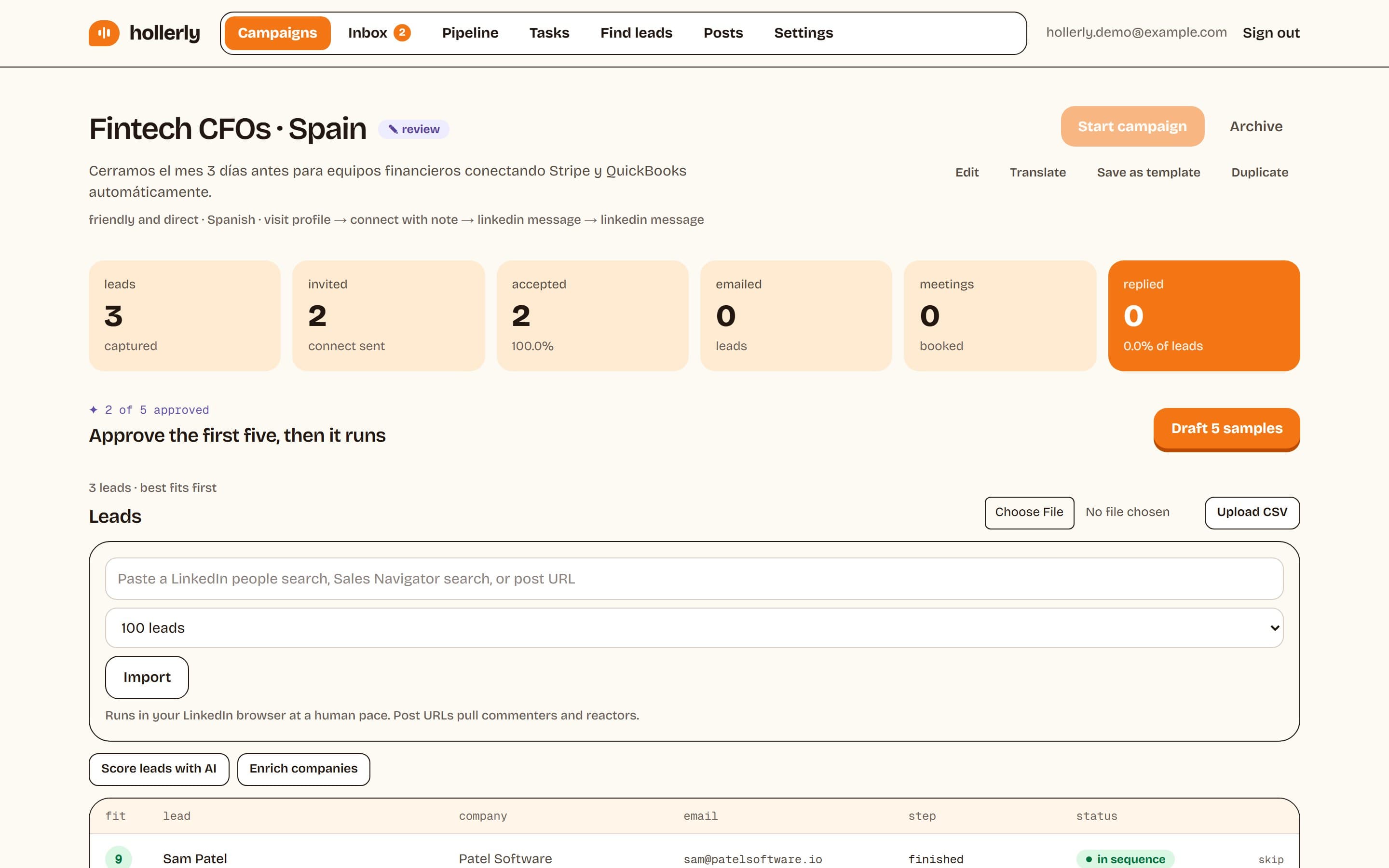
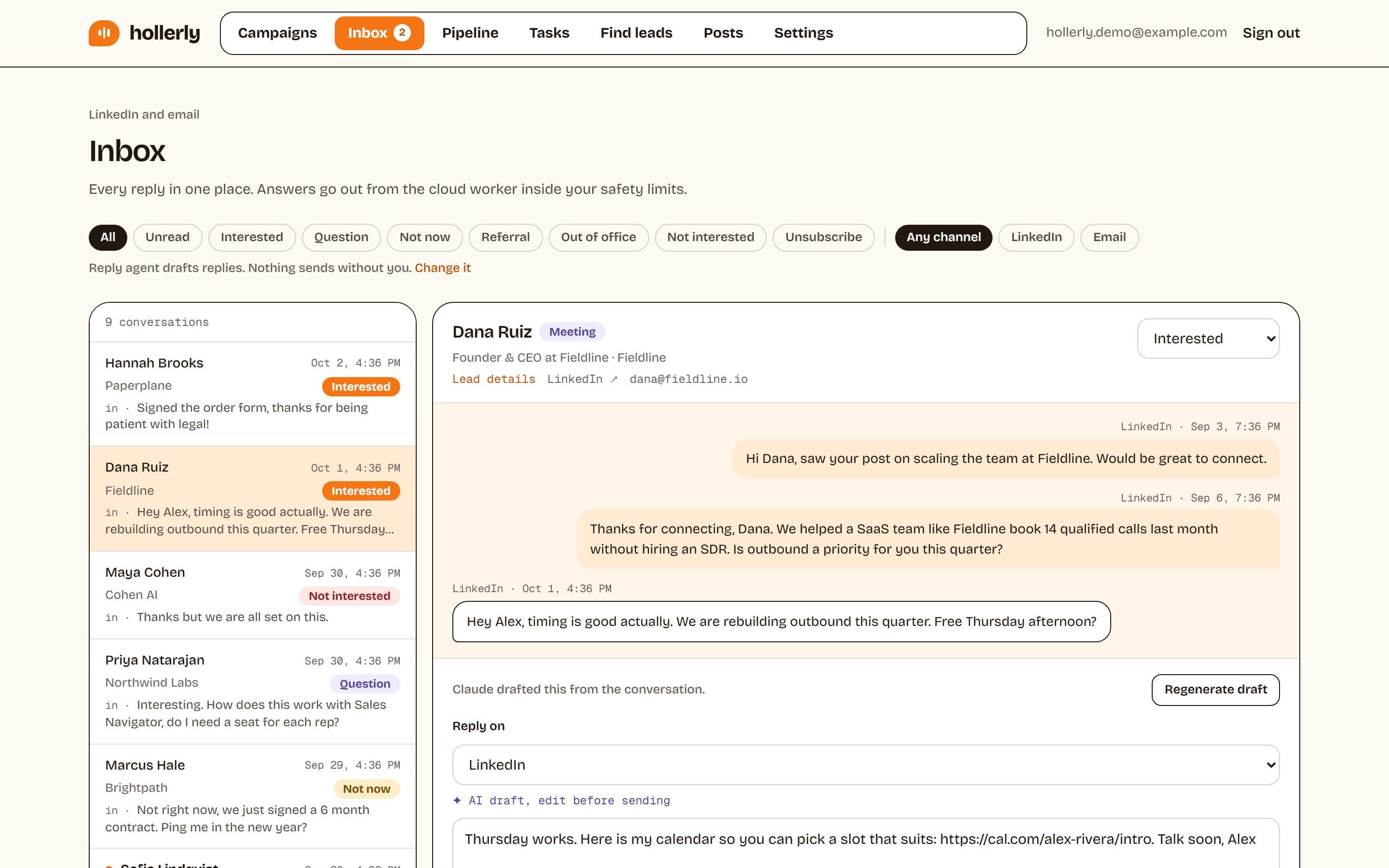
Where PhantomBuster is stronger: scraping and data workflows across many websites, an MCP server and API on its plans, and a Salesforce export. Hollerly has no general web scraper, no B2B contact database and no Salesforce sync. Plans: Starter $19, Pro $49 and Agency $69 a month, with a 7-day free trial of Pro. See the PhantomBuster alternatives page for a longer list.
2. Waalaxy
Waalaxy is a simple LinkedIn prospecting tool with 99+ ready-made sequences, priced from €19 per user a month for 300 invitations. It removed its Chrome extension and went fully cloud in July 2026. Email sequences need the €69 Business plan. Read PhantomBuster vs Waalaxy.
3. Dripify
Dripify is a cloud drip campaign builder for LinkedIn and email, from $59 per user a month ($39 billed annually). It lists 100 email finder credits a month on every plan and a reply inbox from Pro. Read Dripify vs PhantomBuster.
4. HeyReach
HeyReach is built for agencies that rotate many LinkedIn senders through one campaign and one inbox. Growth costs $79 per sender a month, and email runs through Instantly, Smartlead or EmailBison.
Verdict
PhantomBuster is a strong data tool. If you need LinkedIn and web data flowing into a spreadsheet or CRM, it does that well and keeps running in the cloud. As a LinkedIn outreach tool it is a kit of parts: you build the Flow, you watch the hours, and you handle replies somewhere else.
If outreach is the goal, a dedicated tool is usually simpler and often cheaper. Hollerly runs the whole sequence, writes each message, and sorts the replies, from $19 a month.
FAQ
+Is PhantomBuster safe for LinkedIn automation?
No automation tool is risk-free, because LinkedIn's user agreement does not allow third-party automation. PhantomBuster runs in a cloud browser with your session. It says most teams send 20 to 40 connection requests a day per account, and its setup guide suggests starting profile scraping at 10 a day, then ramping up slowly.
+Does PhantomBuster have a free plan?
Yes. The free plan includes 30 minutes of execution time a month, one slot and 50 MB of storage, with no AI or email credits and exports limited to 10 rows. There is also a 14-day trial with no credit card, 2 run hours and 5 slots, according to PhantomBuster's pricing explainer.
+How much does PhantomBuster cost?
PhantomBuster Start costs $69 a month, Grow $159 and Scale $439, or $56, $128 and $352 a month on annual billing. Plans differ by execution hours (20, 80 and 300), slots and credits. These figures come from PhantomBuster's pricing explainer, updated July 21, 2026, so confirm them on its pricing page.
+What is the main difference between PhantomBuster and Hollerly?
PhantomBuster is a data and workflow toolkit billed by execution hours: you chain automations and export results. Hollerly is an outreach tool at a flat monthly price: it imports leads, writes every LinkedIn message and email with AI, follows up until people reply, and collects replies in one tagged inbox.
+Can I use PhantomBuster and Hollerly together?
Yes. Some teams keep PhantomBuster for scraping and enrichment across several websites, export the results as a CSV with LinkedIn URLs or emails, and upload that file to a Hollerly campaign. Hollerly skips anyone on your do-not-contact list or already in another campaign, then runs the outreach and handles replies.
+Does PhantomBuster need a browser extension?
Not to run. PhantomBuster's automations run in a cloud browser, so you can close your own browser once setup is done. Its setup guide does recommend its browser extension for connecting your LinkedIn session, because it fills in the session token and makes reconnecting faster when LinkedIn signs you out.
Get replies without the busywork
Hollerly finds the people, writes every message with AI and follows up on LinkedIn and email until they reply. Runs in the cloud, from $19 a month.
Start my 7-day free trial