8 Best Meet Alfred Alternatives in 2026
If you're comparing a Meet Alfred alternative, you're probably weighing price against what happens after someone replies. Meet Alfred is a cloud-based tool for LinkedIn, email and X with social posting, and its pricing page displays plans from $29 per user a month. This guide compares eight tools on price, inbox, AI writing and safety, using each vendor's own pages as checked on October 2, 2026.
Hollerly is our product, so it's listed first. We say where the others, and Meet Alfred itself, are stronger.
Hollerly, Waalaxy and Dripify are our top three Meet Alfred alternatives for 2026. People usually look elsewhere because Meet Alfred keeps email on Business and CRM integrations on its three-seat Teams plan, and lists no unified inbox or reply tagging. Hollerly starts at $19 with an inbox on every plan, but it has no X outreach, social scheduling or Salesforce sync.
Top 3 Meet Alfred alternatives at a glance
| # | Tool | Best for | Pricing | Key differentiator |
|---|---|---|---|---|
| 1 | Hollerly | Solo sellers and small teams who want replies handled | From $19/mo | AI writes messages, tags replies and drafts answers |
| 2 | Waalaxy | Small budgets starting on LinkedIn | From €19/user/mo | 99+ ready-made sequences |
| 3 | Dripify | Individual sellers who want cloud sequences | From $59/user/mo, or $39 billed yearly | Published daily quotas per plan |
Looking for a Meet Alfred alternative with an inbox that does more?
Meet Alfred covers a lot of ground: LinkedIn, email and X, a Lead Finder, social media scheduling and Beatrix AI. But the pieces are spread across plans. Email and multichannel steps start on Business. White label, team management and the Salesforce and HubSpot integrations start on Teams, which needs at least three seats.
Its pages also don't list a unified inbox, reply tagging or A/B testing. If your campaigns already get replies, the next bottleneck is sorting and answering them, and that's where a Meet Alfred alternative can save the most time.
One more thing to check: the prices Meet Alfred displays ($29, $49 and $39 per user) appear next to its annual toggle, which says "save 40%". The monthly-billed prices weren't clearly shown when we checked, so confirm them on the Meet Alfred pricing breakdown or on its own site.
Why listen to us?
We build Hollerly, a LinkedIn and email outreach tool, so we have a stake in this list and we put ourselves first. To keep it fair, we read each vendor's own pricing and product pages on October 2, 2026, quote prices as listed that day, and say "not listed" when we couldn't confirm something. We don't quote ratings or reviews we haven't checked, and we say where another tool is the better choice, including over Hollerly.
What is Meet Alfred?
Meet Alfred is a multichannel LinkedIn automation tool for sales teams, agencies and recruiters, and calls itself "the original LinkedIn automation tool". It states that it uses cloud-based sending, with smart limits and randomized human-like behavior built into every campaign. It works with Basic, Premium and Sales Navigator LinkedIn accounts. For a fuller look, read our Meet Alfred review.
Key features
- LinkedIn automation: campaigns for Basic, Premium and Sales Navigator accounts.
- Multichannel: email and X steps on Business and up, plus social media scheduling.
- Lead Finder: capped at 1,000, 5,000 or 10,000 results depending on the plan.
- Teams: white label and team management on Teams and up.
- Integrations: Salesforce and HubSpot on Teams and up, plus Zapier and webhooks.
- Beatrix AI: free to try with any paid plan; later price not listed.
Pricing
| Plan | Displayed price | What's included |
|---|---|---|
| Individual | $29 per user a month | 1 seat, LinkedIn only, Lead Finder 1,000 |
| Business | $49 per user a month | LinkedIn, email and X, Lead Finder 5,000 |
| Teams | $39 per user a month, 3 seat minimum | Lead Finder 10,000, white label, team management, CRM integrations |
| Unlimited | Custom pricing | Unlimited seats, dedicated success manager |
Meet Alfred lists a free trial with no credit card; the length wasn't stated.
- ✓Low displayed entry price of $29 per user
- ✓LinkedIn, email and X, plus social scheduling
- ✓Cloud-based sending
- ✓No-card trial
- ✓White label on Teams
- ✕Monthly-billed prices not clearly shown
- ✕Email needs Business or higher
- ✕CRM integrations start on Teams (3 seats minimum)
- ✕No unified inbox, reply tagging or A/B testing listed
Why look for a Meet Alfred alternative?
1. Replies aren't sorted for you
Meet Alfred's pages don't list a unified inbox or reply tagging. Hollerly puts LinkedIn and email replies in one inbox on every plan, and on Pro, Claude tags each reply by intent and drafts an answer with your booking link.
2. Email needs the Business plan
The Individual plan is LinkedIn only. Business adds email and X at $49 per user as displayed. Hollerly Pro is also $49, and adds email from your own mailbox, AI reply drafts, A/B tests and CRM sync.
3. CRM sync starts on Teams
Salesforce and HubSpot integrations start on Teams, which needs three seats at $39 each as displayed, so $117 a month. Hollerly syncs with HubSpot and Pipedrive on Pro for one person, and Agency is $69 for three LinkedIn accounts and three seats.
4. Monthly prices aren't clear
The displayed prices sit next to an annual toggle that says "save 40%", so monthly billing may cost more. Hollerly's prices are monthly, with no annual commitment.
5. Safety is described in general terms
Meet Alfred mentions smart limits, randomized behavior and cloud sending, but no numbers, proxies or IPs. Hollerly publishes its defaults on the LinkedIn automation safety page: 20 invites a day, a two-week warm-up and a 24-hour pause on a rate limit.
8 best Meet Alfred alternatives in 2026
| # | Tool | Best for | Pricing | How it runs |
|---|---|---|---|---|
| 1 | Hollerly | Solo sellers and small teams | From $19/mo | Cloud, dedicated browser and IP |
| 2 | Waalaxy | Small budgets | From €19/user | Chrome Store install |
| 3 | Dripify | Individual sellers | From $59/user ($39 yearly) | Cloud web app |
| 4 | Expandi | LinkedIn-first agencies | $99/mo ($79 yearly) | Cloud, dedicated IP |
| 5 | La Growth Machine | LinkedIn, email and X sequences | From €60 per identity | Cloud, mobile proxies |
| 6 | Closely | A few accounts with warmup | From $65/mo ($39 yearly) | Cloud, residential IP |
| 7 | Octopus CRM | The lowest price | From $9.99/mo ($6.99 yearly) | Browser extension |
| 8 | Linked Helper | Control on a budget | From $15 per license | Desktop app |
1. Hollerly
Best for: solo sellers, founders and small teams who want LinkedIn and email outreach written by AI, and replies handled in one place.
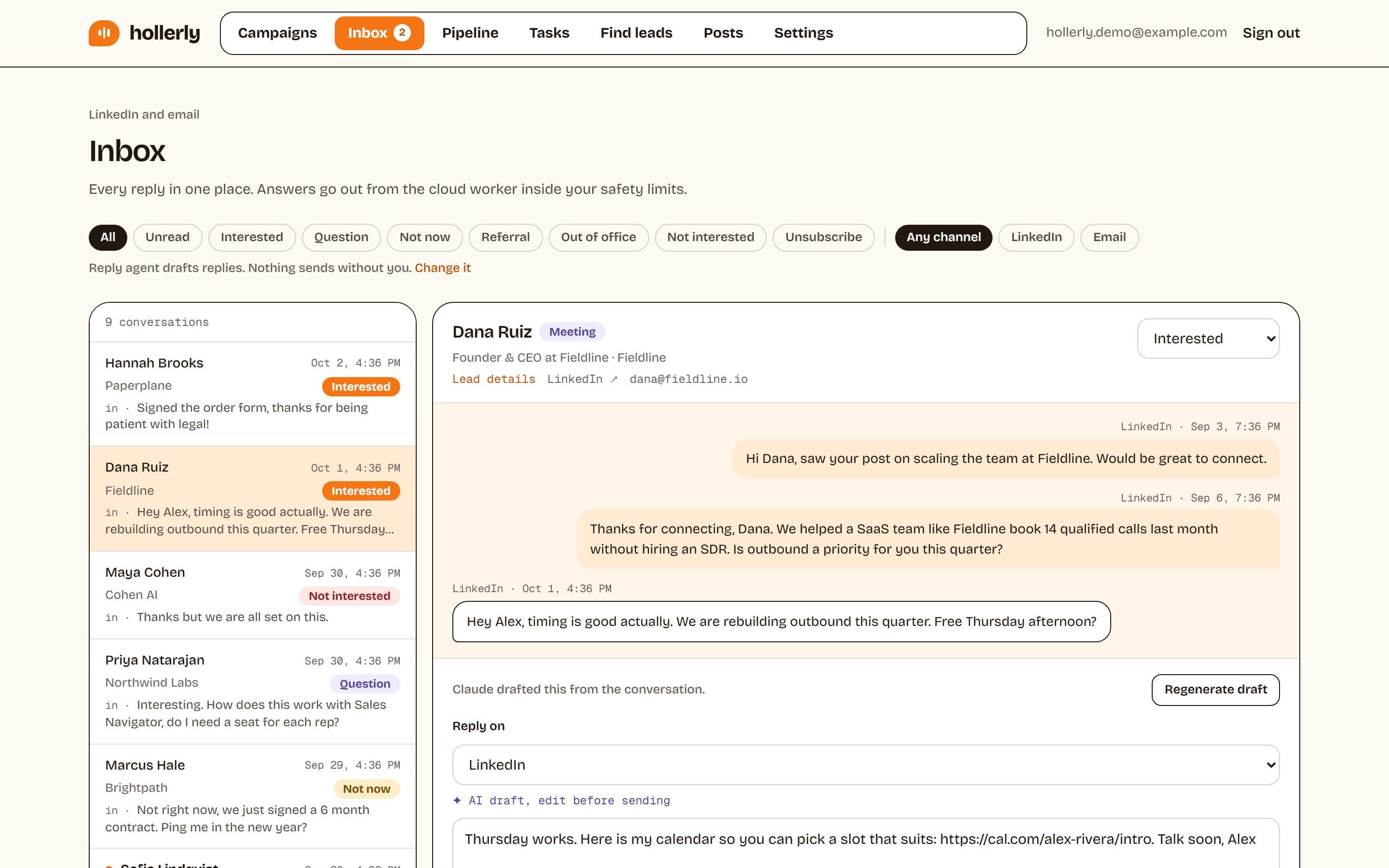
Hollerly runs each LinkedIn account from a dedicated cloud browser with its own IP in your country, so campaigns keep going with your laptop closed. Claude writes each connection note, message and email from the prospect's headline, latest post and company website. You approve the first five, then it runs. On Pro, email steps go out from your own Gmail, Outlook or SMTP mailbox, and a reply on either channel stops the sequence.
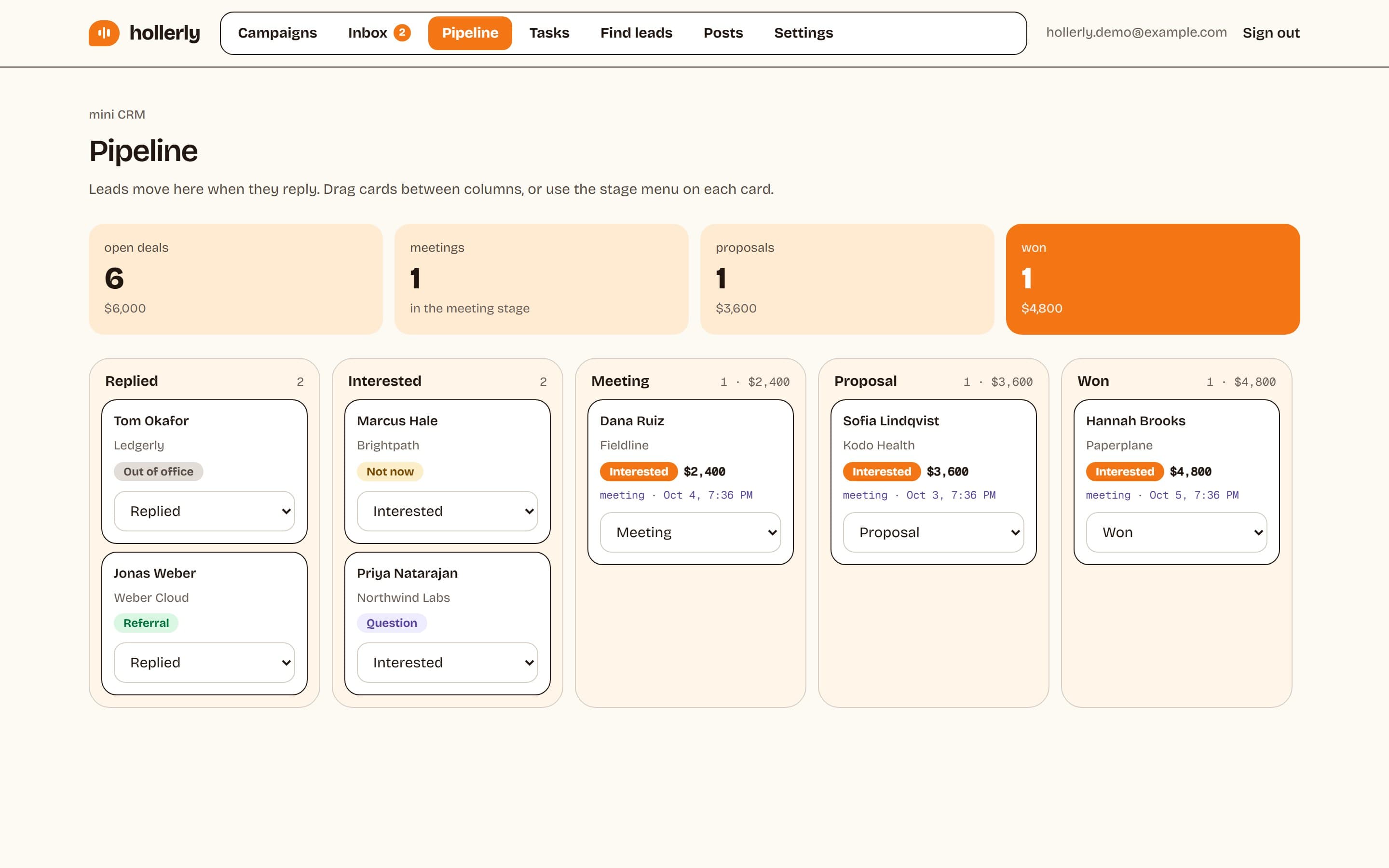
Where it fills the Meet Alfred gap: what happens after the reply. Claude tags each reply, drafts an answer, interested leads move to a pipeline board, and Calendly or Cal.com meetings get a prep brief. Where it's weaker: no X outreach or Facebook and Instagram scheduling (it only writes and schedules LinkedIn posts), no Salesforce sync, no lead database, no email warmup, and fewer integrations as a newer product.
Key features
- AI-written notes, messages and emails researched from each lead's profile, latest post and company website
- Unified LinkedIn and email inbox on every plan; AI reply tags and drafts on Pro
- Pipeline board, meeting tracking and prep briefs on Pro
- HubSpot and Pipedrive sync, Slack alerts, webhooks, Zapier and Make on Pro
- Published safety defaults: daily caps, warm-up, working hours and automatic pauses
Pricing (as listed on October 2, 2026)
- Starter: $19 a month, 1 LinkedIn account, 300 connection requests a month
- Pro: $49 a month, email steps, 200 email finder credits, AI reply drafts
- Agency: $69 a month, 3 LinkedIn accounts, 3 seats, white-label reports
- 7-day free trial of Pro, no card
- ✓From $19 a month, billed monthly
- ✓Inbox on every plan; AI reply tags and drafts on Pro
- ✓CRM sync for one person on Pro
- ✓Runs in the cloud with a dedicated browser and IP
- ✕No X outreach or Facebook and Instagram scheduling
- ✕No Salesforce sync or lead database
- ✕No email warmup, calls or SMS
- ✕Agency tops out at 3 LinkedIn accounts
2. Waalaxy
Best for: solo users and small teams starting LinkedIn prospecting on a small monthly budget.
Waalaxy is a LinkedIn and email outreach tool installed from the Chrome Store, with 99+ ready-made sequences, an email finder and CRM sync. Pro is capped at 300 invites a month and the other plans at 800. Cold email is on the Business plan, and its AI assistant is labeled "soon".
Waalaxy's €19 Pro plan undercuts Meet Alfred's displayed Individual price, and it lists HubSpot and Pipedrive sync. Its inbox is a paid add-on. Hollerly matches the entry price and includes an inbox from Starter. See our Waalaxy alternative page.
Key features
- 99+ ready-to-use sequences and automated follow-ups
- Email finder with 25 to 500 credits a month
- Cold email and LinkedIn plus email campaigns on Business
- API plus Make, Zapier and n8n on Advanced and up
Pricing (as listed on October 2, 2026)
- Pro: €19 a user a month, 300 invites a month
- Advanced: €49, 800 invites a month
- Business: €69, adds cold email
- 14-day free trial on all plans
- ✓€19 monthly entry
- ✓API and automation modules on Advanced
- ✓14-day trial on every plan
- ✕Monthly invite caps
- ✕Email needs the top plan
- ✕Inbox is a paid add-on
3. Dripify
Best for: individual sellers and small teams who want cloud LinkedIn and email sequences priced per seat.
Dripify is a cloud LinkedIn automation tool with a drag-and-drop sequence builder, email steps, 100 email finder credits a month on every plan and AI icebreakers. It publishes daily quotas per plan, so you know exactly what each tier allows.
Unlike Meet Alfred, Dripify puts HubSpot, webhooks and an API on Pro for one user. Basic allows only one campaign, and A/B testing needs Advanced. Hollerly includes unlimited campaigns and AI-written messages from $19. See our Dripify alternative page.
Key features
- Drag-and-drop sequences with actions and conditions
- Email finder and verification, 100 credits a month
- Inbox on Pro and up; A/B testing on Advanced
- HubSpot, Salesforce, Make, Zapier, webhooks and API
Pricing (as listed on October 2, 2026)
- Basic: $59 a user a month, or $39 billed yearly, 1 campaign
- Pro: $79, or $59 billed yearly
- Advanced: $99, or $79 billed yearly
- 7-day free trial with Advanced features, no card
- ✓No-card trial with Advanced features
- ✓Published daily quotas per plan
- ✓API, webhooks, HubSpot, Make and Zapier
- ✕Basic allows one campaign
- ✕A/B testing only on the $99 tier
- ✕Small email finder allowance
4. Expandi
Best for: agencies and sales teams running LinkedIn-first campaigns who want a dedicated IP and native CRM sync.
Expandi is a cloud LinkedIn automation tool with smart campaigns built from 19 actions and 11 conditions, A/B testing and a smart inbox with labels, tags and notes. Each account gets a dedicated country-based IP and an automatic warm-up.
Expandi has what Meet Alfred doesn't list: a tagged inbox, A/B tests and a dedicated IP, plus native HubSpot, Salesforce and Pipedrive. It costs more and lists no AI writing. Hollerly is cheaper and writes each message with AI. See our Expandi alternative page.
Key features
- Smart campaigns with 19 actions and 11 conditions
- Dedicated country-based IP and automatic warm-up
- Smart inbox with labels, tags and notes
- Native HubSpot, Salesforce and Pipedrive, plus Zapier, webhooks and API
Pricing (as listed on October 2, 2026)
- Business: $99 a month, or $79 billed yearly
- Agency: custom pricing for 10 or more seats
- 7-day free trial, no card
- ✓Dedicated IP and warm-up on every account
- ✓CRM sync on the main plan
- ✓Conditional campaigns and A/B testing
- ✕$99 a month on monthly billing
- ✕No built-in AI writing listed
- ✕No lead database, email finder or warmup
5. La Growth Machine
Best for: teams running LinkedIn-first sequences with email and X follow-ups.
La Growth Machine runs LinkedIn, email and X steps in one cloud sequence, with AI voice messages, an AI writing assistant, waterfall email enrichment and a 27M+ company database. It states it uses dedicated 5G mobile proxies. It's priced per identity, in euros.
If X outreach is why you chose Meet Alfred, La Growth Machine is the closest match, with stronger data. The inbox and A/B tests need Pro at €120. Hollerly has no X steps but costs less for LinkedIn and email. See the La Growth Machine alternative page.
Key features
- LinkedIn, email and X in one sequence; calls on Ultimate
- Waterfall enrichment and a 27M+ company database
- Multichannel inbox and A/B testing on Pro and up
- Zapier, Make, Clay, Slack, API and webhooks
Pricing (as listed on October 2, 2026)
- Basic: €60 per identity a month, up to 3 identities
- Pro: €120 per identity a month
- Ultimate: see their pricing page
- 14-day free trial, no card
- ✓LinkedIn, email and X on every plan
- ✓Built-in enrichment and company data
- ✓Cloud running with mobile proxies stated
- ✕Priced per identity
- ✕Inbox and A/B testing need Pro
- ✕CRM sync only on Ultimate
6. Closely
Best for: small teams and agencies running LinkedIn plus email from a few accounts who want IPs, warmup and data in one price.
Closely runs LinkedIn and email sequences in the cloud with a dedicated residential IP per LinkedIn account. Every plan includes unlimited email accounts, account warmup and white label, and its smart inbox handles DMs, InMails and email replies with assignment and tagging.
Closely puts white label on its entry plan, where Meet Alfred needs Teams, and adds an inbox with tagging. AI personalization starts on Growth at $159. Hollerly is cheaper on monthly billing and writes with AI from Starter.
Key features
- Dedicated residential IP and LinkedIn warmup per account
- Unlimited email accounts and warmup on every plan
- Smart inbox with assignment and tagging
- Salesforce, HubSpot, Pipedrive and GoHighLevel, plus webhooks
Pricing (as listed on October 2, 2026)
- Starter: $65 a month, or $39 billed yearly, 1 LinkedIn account
- Growth: $159, or $95 billed yearly, 3 accounts, 3,000 credits
- Essential: $259, or $155 billed yearly, 5 accounts
- Free trial offered; length not stated
- ✓Residential IP and warmup on every plan
- ✓White label on every plan
- ✓Annual billing about 40% below monthly
- ✕Starter has no data or AI credits
- ✕Trial length not stated
- ✕Zapier, Make and API not listed
7. Octopus CRM
Best for: solo users who want low-cost LinkedIn connection and message automation in the browser.
Octopus CRM is a browser extension for LinkedIn automation: personalized connection requests, bulk messages to 1st-degree connections, profile visits and endorsements, run as campaigns and funnels. It includes a personal CRM dashboard and doesn't ask for your LinkedIn credentials.
Octopus CRM is the cheapest option if Meet Alfred's price is the issue, from $9.99 a month. It lists no email, AI writing or inbox, and it runs in your browser. Hollerly costs more but runs in the cloud and writes each message. See our Octopus CRM alternative page.
Key features
- Automated connection requests and messages
- Profile visits and skill endorsements
- Campaigns and funnels with a personal CRM dashboard
- Zapier, HubSpot, Google Sheets and Zoho
Pricing (as listed on October 2, 2026)
- Starter: $9.99 a month, or $6.99 billed yearly
- Pro: $14.99, Advanced: $21.99, Unlimited: $39.99 a month
- 7-day trial, no card
- ✓Lowest entry price here
- ✓No-card trial
- ✓Doesn't ask for LinkedIn credentials
- ✕Runs in your browser only
- ✕No AI writing or email listed
- ✕Plan limits not published
8. Linked Helper
Best for: budget users and agencies who can keep desktop software running on a PC or a server.
Linked Helper is a desktop app sold per LinkedIn account license, with 30+ action types, profile and company scraping, email finding, a built-in CRM and AI messages. The computer or server running it has to stay on.
Linked Helper is cheaper than Meet Alfred and lists a long set of native CRM integrations on its base plan. It sends no email, and you manage the machine and proxies. Hollerly runs in the cloud for a little more. See the Linked Helper alternative page.
Key features
- 30+ campaign action types
- Scraping of profiles, companies and employees, plus email finding
- Built-in CRM with notes, tags and an inbox
- HubSpot, Salesforce, Pipedrive, Zoho, plus Zapier, Make and n8n
Pricing (as listed on October 2, 2026)
- Standard: $15 per license a month, down to $8.25 on a 12-month term
- Pro: see their pricing page
- 14-day Pro trial, no card
- ✓From $8.25 a month on a 12-month term
- ✓30+ actions and a built-in CRM
- ✓Long list of native CRMs
- ✕A computer or server must stay on
- ✕Proxies bought separately
- ✕No email sending
Ready to move beyond Meet Alfred?
Stay with Meet Alfred if X outreach and social scheduling are part of your routine, or if a large team needs its Unlimited plan. If you want replies sorted, drafted and moved to a pipeline without a three-seat plan, try another tool on one campaign. Our guide to the best LinkedIn automation tools covers more options, and Hollerly's plans are on the pricing page.
- Export your leads from Meet Alfred as a CSV.
- Start a Hollerly trial and connect your LinkedIn account, and your mailbox for email steps.
- Pick a sequence template, upload the CSV and approve the first five messages.
- Pause the Meet Alfred campaign. Hollerly skips duplicates and anyone on your do-not-contact list.
FAQ
+What is the best Meet Alfred alternative?
For LinkedIn and email outreach with AI-written messages and an inbox that tags and drafts replies, Hollerly starts at $19 a month. Waalaxy and Dripify are other common choices. If X outreach and social scheduling matter to you, Meet Alfred covers them and Hollerly does not.
+What is the main difference between Meet Alfred and Hollerly?
Meet Alfred covers LinkedIn, email, X and social scheduling, with CRM integrations from its three-seat Teams plan. Hollerly covers LinkedIn and email only, but writes each message with AI and puts an inbox on every plan, with AI reply drafts, a pipeline board and CRM sync on its $49 Pro plan.
+Can I use Meet Alfred and Hollerly together?
Yes, if each LinkedIn account runs in only one tool. Running two tools on one profile doubles activity and makes LinkedIn's limits harder to respect. Some people keep X and social scheduling in Meet Alfred and move LinkedIn and email campaigns to Hollerly for the AI inbox.
+Which Meet Alfred alternative is best for small budgets?
Octopus CRM is the cheapest at $9.99 a month, but it runs in your browser and lists no email or AI. Hollerly Starter at $19 and Waalaxy Pro at €19 cost a little more. Hollerly adds cloud running, AI-written messages and an inbox on its entry plan.
+Is Hollerly cheaper than Meet Alfred?
For small teams, usually. Meet Alfred displays $29 per user for Individual and $39 per user for Teams with three seats minimum, next to its annual toggle (checked October 2, 2026). Hollerly Starter is $19 a month and Agency is $69 for three LinkedIn accounts, both billed monthly.
+Is Meet Alfred cloud-based like Hollerly?
Yes. Meet Alfred says it uses cloud-based sending, and Hollerly runs each LinkedIn account in a dedicated cloud browser with an IP in your country. Neither needs your computer to stay on while campaigns run, so outreach continues after you log off for the day.
Get replies without the busywork
Hollerly finds the people, writes every message with AI and follows up on LinkedIn and email until they reply. Runs in the cloud, from $19 a month.
Start my 7-day free trial