The Best LinkedIn Automation Tools in 2026
Choosing between the best LinkedIn automation tools in 2026 is harder than it looks. Most of them send connection requests and follow-ups. The real differences are in how they run (cloud, Chrome extension or desktop app), how they protect your account, whether they write good messages, whether they handle email, and what they cost per seat.
We make one of these tools, Hollerly, so we've put it first and labeled it clearly. Every other tool is described from its own pricing or product page, checked on October 2, 2026, with who it suits and where it falls short. Where a detail wasn't listed, we say so rather than guess.
How we compared
We looked at each tool on six points:
- Price: the entry price on the vendor's pricing page, per user, seat or sender where that's how it's sold.
- How it runs: in the cloud, as a Chrome extension, or as desktop software. Cloud tools run with your laptop closed.
- LinkedIn steps: visits, invites, messages and other actions.
- Email: whether email follow-ups are included, and on which plan.
- AI and replies: AI writing, a unified inbox and reply tagging.
- Fit: who the tool is built for, and where it's weaker.
We didn't run paid tests on every tool, and we haven't invented ratings or user counts. Prices change, so check each vendor's page before you buy. "Not listed" means the feature wasn't on that vendor's pricing or plan page when we checked; it may still exist elsewhere in the product.
Comparison table
| Tool | Entry price | AI writing | Unified inbox | |
|---|---|---|---|---|
| Hollerly (our tool) | $19/mo | Pro ($49) | Yes | Every plan |
| Waalaxy | €19/user | €69 Business plan | Not listed | Paid add-on |
| Dripify | $59 to $99/user monthly ($39 to $79 yearly) | Yes | Not listed | Pro and up |
| HeyReach | $79/sender | Via Instantly and Smartlead | Yes | Yes |
| Expandi | $79 to $99/seat | Email follow-ups | Not listed | Not listed |
| Lemlist | $87/user (Multichannel) | Yes | Yes | Yes |
| La Growth Machine | €60/identity | Yes | Yes | Pro and up |
| Skylead | $100/seat | Yes | Not listed | Agency plan |
| Prosp | $79.99/account | Not listed | Yes | Yes |
| Linked Helper | See pricing page | Not checked | AI features listed | Not checked |
| Octopus CRM | $9.99/mo | Not checked | Not checked | Not checked |
"Not checked" means we didn't verify that detail on the vendor's page for this guide. On how each tool runs: Hollerly runs in the cloud, Linked Helper describes itself as desktop software, and Octopus CRM is a Chrome extension. Check the others' product pages if that matters to you.
Top LinkedIn automation tools, reviewed
Here are the top LinkedIn automation tools in more detail, starting with ours.
1. Hollerly (our tool): best for AI-written outreach on a small budget
Price: Starter $19/mo, Pro $49/mo, Agency $69/mo for three LinkedIn accounts. 7-day free trial of Pro, no card.
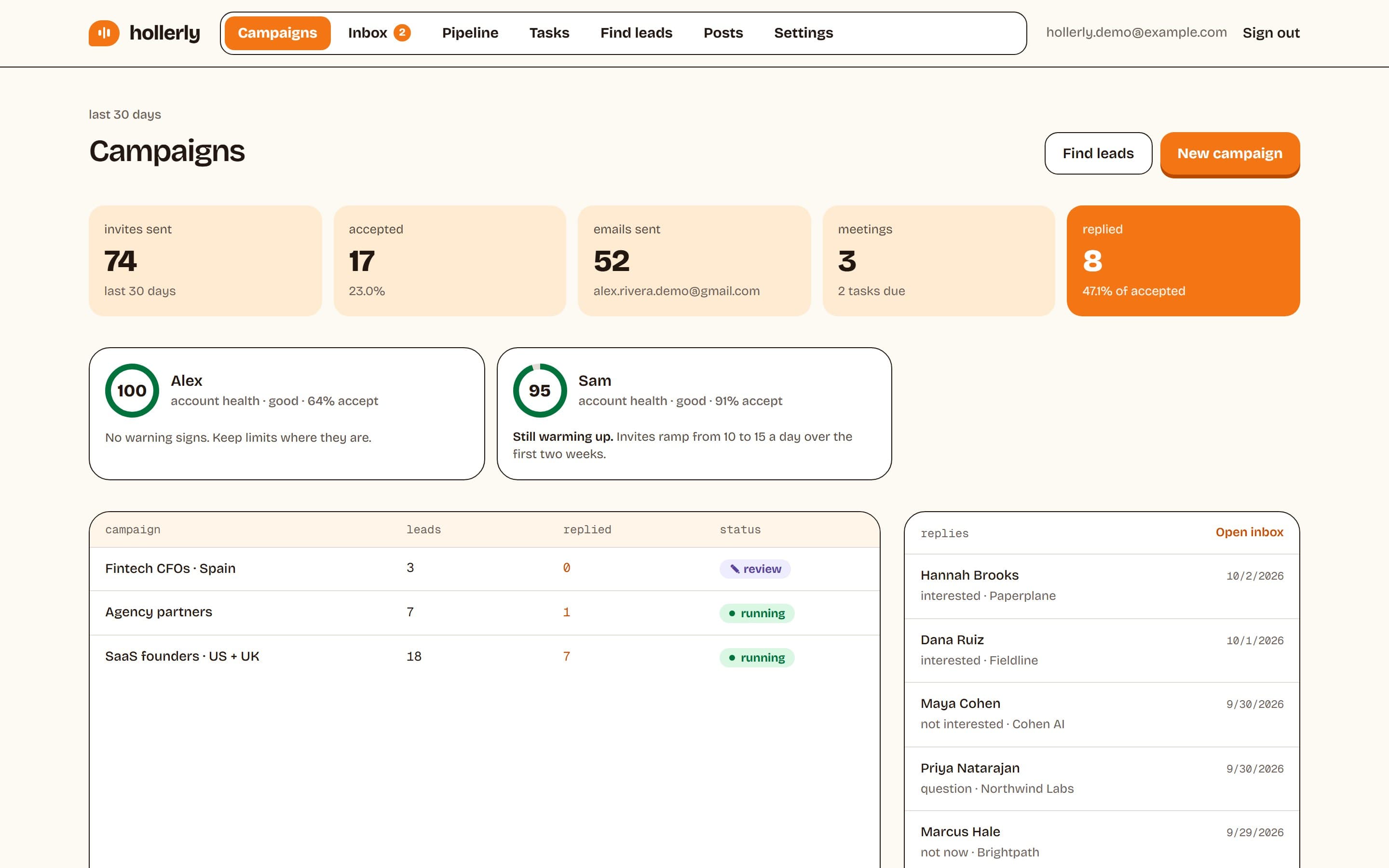
Hollerly runs LinkedIn and email outreach from the cloud. Claude writes each note, message and email from the lead's profile, latest post and company website, and you approve the first five before a campaign runs. Leads come from a LinkedIn or Sales Navigator search, a post URL or a CSV. Replies land in one inbox; on Pro they're tagged by intent with an AI draft answer, and there's a pipeline board, A/B tests, HubSpot and Pipedrive sync, and email from your own mailbox.
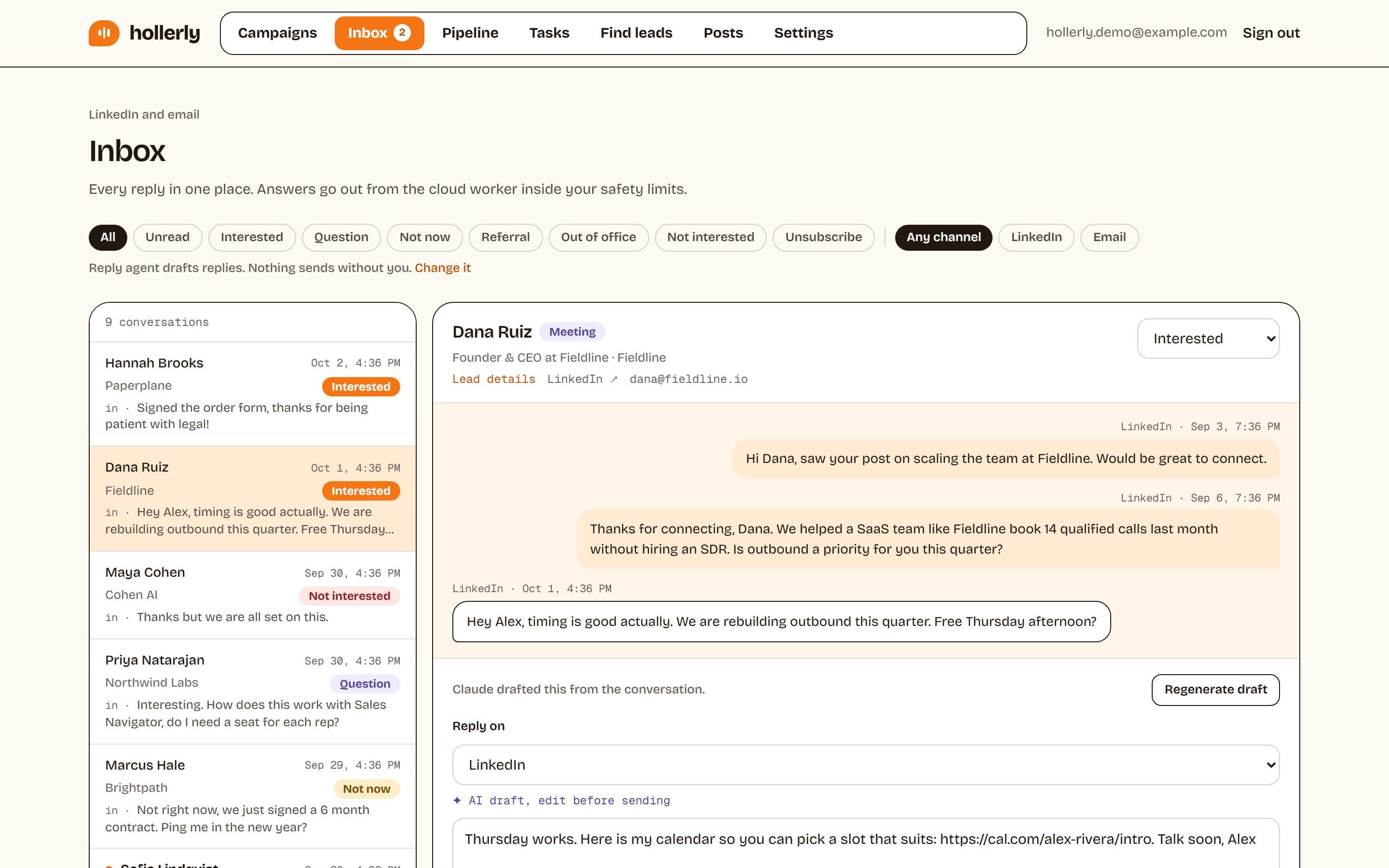
Safety defaults are conservative: 20 invites a day and 100 a week by default, a two-week warm-up, working hours only, and one dedicated browser and IP in your country per account.
- ✓$19 entry price, 7-day trial with no card
- ✓AI writes every message from real research on the lead
- ✓AI reply tagging and drafts at $49
- ✓Clear, conservative safety limits
- ✕No built-in B2B contact database
- ✕No email warmup network or done-for-you mailboxes
- ✕No calls, SMS or WhatsApp
- ✕Newer product with fewer integrations than older tools
- ✕Agency plan tops out at three LinkedIn accounts
More: pricing and LinkedIn automation safety.
2. Waalaxy: best for simple LinkedIn-only campaigns
Price: Pro €19, Advanced €49, Business €69 per user a month, with a 14-day free trial on all plans. Pro includes 300 LinkedIn invitations a month; Advanced and Business include 800.
Waalaxy is easy to start with and has pre-built sequences and CRM sync. Cold email sequences and multichannel campaigns sit on the €69 Business plan, and the inbox is listed as a paid add-on. AI writing wasn't listed on its pricing page.
Good fit: solo users who want LinkedIn-only sequences at a low price. Weaker for: email, reply handling and AI-written messages on the lower plans. Read our Waalaxy alternative page and Waalaxy pricing breakdown.
3. Dripify: best for classic drip sequences
Price: $59 to $99 per user a month on monthly billing, or $39 to $79 billed yearly.
Dripify runs LinkedIn sequences with email steps and 100 email finder credits a month. Its unified inbox, HubSpot integration and API are on Pro and up; A/B testing and multi-team features are on Advanced. AI writing wasn't listed.
Good fit: teams who want straightforward LinkedIn drips with a known tool. Weaker for: AI-written messages and reply tagging. See our Dripify alternative and Dripify review.
4. HeyReach: best for agencies running many senders
Price: $79 per sender a month.
HeyReach is built around many LinkedIn sender accounts in one place. It lists AI writing, voice notes, a unified inbox with sentiment tagging, HubSpot, an API with MCP, and Make, Zapier and n8n. Email sequences run through Instantly and Smartlead rather than its own sending.
Good fit: agencies with lots of senders. Weaker for: solo users, for whom per-sender pricing adds up, and email without another tool. See HeyReach alternatives and our HeyReach review.
5. Expandi: best for established cloud LinkedIn automation
Price: $79 to $99 per seat a month.
Expandi is an established LinkedIn automation tool with LinkedIn steps and email follow-ups. It has an agency plan, and personalized images are a paid add-on. AI writing, a unified inbox and A/B testing weren't listed on its pricing page.
Good fit: users who want an established tool and are comfortable with the per-seat price. Weaker for: price-sensitive solo users. See Expandi alternative and Expandi review.
6. Lemlist: best all-in-one multichannel suite
Price: $55/mo for the Email plan; $87 per user for Multichannel.
Lemlist is the broadest tool here. Multichannel covers LinkedIn (visits, follows, invites, messages, InMail and voice notes), email with lemwarm warmup, calls, WhatsApp as an add-on, a database of 650M+ contacts, AI writing, an AI agent called lemAgent and a unified inbox.
Good fit: teams who want data, email infrastructure and LinkedIn in one tool, and will pay for it. Weaker for: LinkedIn-first users on a budget. See Lemlist alternative and our Lemlist review.
7. La Growth Machine: best for multichannel sequences by identity
Price: from €60 per identity a month.
La Growth Machine combines LinkedIn and email, with AI writing, AI voice messages, a 27M+ company database and enrichment. Rotating senders, a unified inbox, A/B tests and calls are on Pro and up; HubSpot and Pipedrive integrations are on Ultimate.
Good fit: teams running LinkedIn and email together who want enrichment built in. Weaker for: smaller budgets that need CRM sync. See our La Growth Machine alternative page.
8. Skylead: best for high email volume alongside LinkedIn
Price: $100 per seat a month.
Skylead pairs LinkedIn steps with email sequences (up to 100K emails a month listed), unlimited email accounts, a lead database, personalized images and an API. Its Unibox is on the Agency plan, and an AI SDR is an add-on.
Good fit: users who send lots of email next to LinkedIn. Weaker for: budget buyers. See Skylead alternative and Skylead pricing.
9. Prosp: best for LinkedIn voice messages
Price: $79.99 per account a month.
Prosp focuses on LinkedIn, with AI writing, voice notes in a cloned voice, a lead finder with enrichment and a unified inbox. Email sequences and CRM integrations weren't listed on its pricing page.
Good fit: LinkedIn-only sellers who want voice messages. Weaker for: email follow-ups. See our Prosp alternative page.
10. Linked Helper: best for running automation on your own machine
Price: see its pricing page; it offers a 14-day Pro trial with no card.
Linked Helper describes itself as desktop software that runs on your own computer or a server you control. It lists AI features on both plans, with more AI credits on Pro. Because it's desktop software, campaigns run when that machine is on.
Good fit: technical users who want local control. Weaker for: anyone who wants outreach running with the laptop closed and no server to manage. See Linked Helper alternative and Linked Helper review.
11. Octopus CRM: best low-cost Chrome extension
Price: $9.99 to $39.99 a month on monthly billing, with a 7-day free trial and no card.
Octopus CRM is a Chrome extension, so it's cheap and quick to install, but it runs inside your browser while it's open.
Good fit: very small budgets and light use. Weaker for: outreach that should run all day without your browser. See our Octopus CRM alternative page.
Best LinkedIn automation tools by use case
| If you are... | Look at |
|---|---|
| A solo seller on a budget who wants good messages | Hollerly Starter or Pro |
| A solo user who only needs simple LinkedIn sequences | Waalaxy, Octopus CRM |
| A team that wants data, email warmup, calls and LinkedIn in one suite | Lemlist |
| An agency with many sender accounts | HeyReach |
| An agency or freelancer with up to three senders | Hollerly Agency |
| Someone who wants LinkedIn voice messages | Prosp, Lemlist, HeyReach, La Growth Machine |
| A technical user who wants local control | Linked Helper |
Which are the best LinkedIn automation tools in 2026 for safety?
People often search for the best LinkedIn automation tools for 2026 that are safe. The honest answer is that none is risk-free: LinkedIn's user agreement doesn't allow bots or browser plugins used to automate or scrape. What separates safer tools is how they behave. Look for:
- Daily and weekly invite caps that are on by default, with hard ceilings
- A warm-up period for new accounts
- One stable IP per account, in your country
- Activity only in working hours, with random gaps
- Automatic pauses when LinkedIn shows a warning or verification screen
Cloud tools have one practical advantage over extensions and desktop apps: your account keeps a consistent location and schedule rather than following your laptop around. Read our LinkedIn automation safety page for Hollerly's exact limits.
What any LinkedIn automation tool can and can't do
It helps to set expectations before you pick a tool, because the marketing around this category is loud.
What automation does well
- Consistency. It sends the follow-up you'd forget, at a steady pace, every working day.
- Time. Visiting profiles, sending invites and chasing non-replies take hours a week by hand.
- Multichannel timing. Tools with email steps can switch channels when a LinkedIn invite goes unanswered.
- Organization. A shared inbox and a do-not-contact list stop two people messaging the same prospect.
What it can't fix
- A weak offer. If the thing you're selling isn't relevant to the person, no sequence makes it relevant.
- A bad list. Poor targeting lowers acceptance rates and raises your account risk at the same time.
- LinkedIn's rules. Every tool runs against LinkedIn's user agreement. Limits reduce risk; they don't remove it.
- Volume past LinkedIn's limits. Weekly invitation limits apply to everyone. More accounts, not more invites per account, is how agencies scale.
A realistic first month
Week one is setup: connect your account, build a search, write or approve messages. With a sensible warm-up, the first two weeks send fewer invites than you might expect. Replies usually start once accepted connections receive the first message. By week four you should know your acceptance rate and reply rate for one audience, which is the number that tells you whether to scale, change the message or change the list.
How to choose
- Decide on channels. LinkedIn only, LinkedIn plus email, or a full suite with calls and data.
- Count your senders. Per-seat and per-sender pricing changes the maths fast.
- Check how it runs. Cloud, extension or desktop decides whether it works with your laptop closed.
- Read the safety defaults. Ignore promises of "undetectable". Look for real numbers.
- Test on a trial. Run one real campaign before you commit.
For more detail on specific matchups, see Dripify vs Waalaxy and HeyReach vs Lemlist.
FAQ
+What is the best LinkedIn automation tool in 2026?
It depends on your setup. For AI-written LinkedIn and email outreach on a small budget, we'd suggest Hollerly, though we make it. Lemlist is the broadest suite, HeyReach suits agencies with many senders, and Waalaxy suits simple LinkedIn-only campaigns. Compare entry prices and channels in the table above.
+Are LinkedIn automation tools safe to use?
No tool is fully safe, because LinkedIn's user agreement doesn't allow third-party automation. The risk drops a lot with conservative limits, a warm-up period, working hours only, one stable IP per account and automatic pauses on warnings. Avoid any tool that promises it can't be detected.
+Is there a free LinkedIn automation tool?
Most tools offer a trial rather than a lasting free plan. On October 2, 2026, Waalaxy and Linked Helper listed 14-day trials, Octopus CRM a 7-day trial and Hollerly a 7-day trial of Pro with no card. Trials are small by design, so use them to test one real campaign.
+Should I choose a cloud tool or a Chrome extension?
A cloud tool runs when your laptop is closed and keeps one steady location for your account. A Chrome extension is cheaper and quick to install but only works while your browser is open. For daily outreach, most people find cloud tools more reliable. Hollerly is cloud only.
Get replies without the busywork
Hollerly finds the people, writes every message with AI and follows up on LinkedIn and email until they reply. Runs in the cloud, from $19 a month.
Start my 7-day free trial