8 Best Linked Helper Alternatives in 2026
The most common reason to look for a Linked Helper alternative is the computer. Linked Helper, which its site also calls Linked Helper 2, is desktop software: the machine running it has to stay on with the app open, or you rent a server to run it. This guide compares eight tools, cloud and local, on price, setup, AI writing and safety, using each vendor's own pages as checked on October 2, 2026.
Hollerly is our product, so it's listed first. Linked Helper is cheaper and has a deep set of actions, so we also say when it's the right tool.
Hollerly, Dux-Soup and Octopus CRM are our top three Linked Helper alternatives for 2026. Most people leave Linked Helper because it needs a computer or server running all day and proxies bought separately. Hollerly runs in the cloud from $19 with AI-written messages, but it costs more than Linked Helper's Standard license and has fewer actions and integrations.
Top 3 Linked Helper alternatives at a glance
| # | Tool | Best for | Pricing | Key differentiator |
|---|---|---|---|---|
| 1 | Hollerly | People who want outreach to run without their computer | From $19/mo | Cloud browser and IP per account, AI-written messages |
| 2 | Dux-Soup | LinkedIn-only users who want a local or cloud choice | $55/seat local, $99/seat cloud | AI personalization with ChatGPT, Claude or Gemini |
| 3 | Octopus CRM | The lowest monthly price | From $9.99/mo, or $6.99 billed yearly | Runs in your browser; doesn't ask for LinkedIn credentials |
Looking for a Linked Helper alternative that runs without your computer?
Desktop automation only works while the machine is on, online and awake. Close the lid and the campaign stops. To run Linked Helper around the clock you rent a VPS, and to avoid sending everything from your own connection you buy proxies, which Linked Helper checks but doesn't supply.
That setup gives you a lot of control for very little money, and many people are happy with it. Others would rather pay a little more for a tool that runs on the vendor's servers, comes with its own IP per account, and keeps going while they travel.
Linked Helper is strong where it counts for power users: 30+ action types, scraping, a built-in CRM, a long list of native CRM integrations, and Zapier, Make and n8n. If you leave, check that your new tool covers the actions you actually use.
Why listen to us?
We build Hollerly, a LinkedIn and email outreach tool, so we have a stake in this list and we put ourselves first. To keep it fair, we read each vendor's own pricing and product pages on October 2, 2026, quote prices as listed that day, and say "not listed" when we couldn't confirm something. We don't quote ratings or reviews we haven't checked, and we say where another tool is the better choice, including over Hollerly.
What is Linked Helper?
Linked Helper is LinkedIn automation software with campaigns, scraping, a built-in CRM and AI messaging, sold per LinkedIn account license. It runs as a desktop app on your computer or on a VPS, not as a browser extension. An optional Cloud Storage plan keeps your data in the cloud, but the automation still runs on your machine. Our Linked Helper review covers it in more depth.
Key features
- Campaigns: unlimited campaigns with 30+ action types, including invites, message sequences and reply detection.
- Scraping and data: profiles, companies and company employees, plus email finding from profiles.
- Built-in CRM: notes, tags and an inbox.
- AI: messages, comments, a reply assistant and ICP detection, with no ChatGPT subscription needed.
- Teams: multi-account workspaces with Owner, Admin, Member and Guest roles.
- Safety: human-like delays and mouse movement, rolling 24-hour limits, and your LinkedIn session never reaches its servers.
Pricing
| Plan | Price | What's included |
|---|---|---|
| Standard (Local storage) | $15 a month; $13.33 on 3 months; $10.05 on 6 months; $8.25 on 12 months | 620 data credits a month, 250 to 1,500 AI credits by term, 20-a-day caps on 11 advanced actions |
| Standard (Cloud storage) | From $16.50 a month on the longest term | Adds cloud backup, multi-device access, team sharing and incoming webhooks |
| Pro (Local or Cloud) | See their pricing page | 3,100 data credits a month, up to 3,000 AI credits, no 20-a-day caps |
Volume discounts start at 10% for 10 to 19 licenses. Linked Helper lists a 14-day trial of Pro with no credit card and no automatic renewal. For the full breakdown, see our Linked Helper pricing guide.
- ✓$15 a month entry, from $8.25 on a 12-month term
- ✓30+ actions, scraping and a built-in CRM
- ✓Long native CRM list plus Zapier, Make and n8n
- ✓Detailed safety approach and workspace roles
- ✓14-day Pro trial with no card
- ✕A computer or VPS must stay on
- ✕Proxies are bought separately
- ✕Pro prices not shown clearly
- ✕LinkedIn only, no email sending listed
Why look for a Linked Helper alternative?
1. The computer has to stay on
Linked Helper runs from the machine you control. If it sleeps, loses Wi-Fi or restarts for an update, the campaign pauses. Cloud tools keep running in your working hours whether your laptop is open or not. That's also why Hollerly has no Chrome extension or desktop app.
2. You manage servers and proxies
Round-the-clock running means renting a VPS, and a different IP means buying a proxy. Hollerly includes a dedicated cloud browser and an IP in your country for each LinkedIn account, and deletes your encrypted login details when you disconnect.
3. Standard caps the advanced actions
The cheapest plan limits 11 advanced actions to 20 a day, and Pro prices weren't clearly shown on the pricing page when we checked. Add a server and proxy, and the low entry price can climb.
4. No email sending
Linked Helper finds emails but lists no email sending. Hollerly Pro adds email steps from your own Gmail, Outlook or SMTP mailbox, and a reply on either channel stops the sequence.
5. You want replies handled for you
Linked Helper has an inbox and a reply assistant. Hollerly goes further on Pro: Claude tags each reply as interested, a question, not now, out of office or unsubscribe, drafts an answer and moves interested leads to a pipeline board.
8 best Linked Helper alternatives in 2026
| # | Tool | Best for | Pricing | How it runs |
|---|---|---|---|---|
| 1 | Hollerly | Hands-off cloud outreach | From $19/mo | Cloud, dedicated browser and IP |
| 2 | Dux-Soup | LinkedIn-only, local or cloud | $55/seat local, $99 cloud | Desktop app or cloud |
| 3 | Octopus CRM | The lowest price | From $9.99/mo ($6.99 yearly) | Browser extension |
| 4 | Waalaxy | Small budgets with ready-made sequences | From €19/user | Chrome Store install |
| 5 | Dripify | Cloud sequences priced per seat | From $59/user ($39 yearly) | Cloud web app |
| 6 | Expandi | LinkedIn-first agencies | $99/mo ($79 yearly) | Cloud, dedicated IP |
| 7 | Closely | A few accounts with IPs and warmup | From $65/mo ($39 yearly) | Cloud, residential IP |
| 8 | Meet Alfred | LinkedIn, email and X | From $29/user as displayed | Cloud-based sending |
1. Hollerly
Best for: people who want LinkedIn and email outreach to run in the cloud, with messages written by AI, and no software to look after.
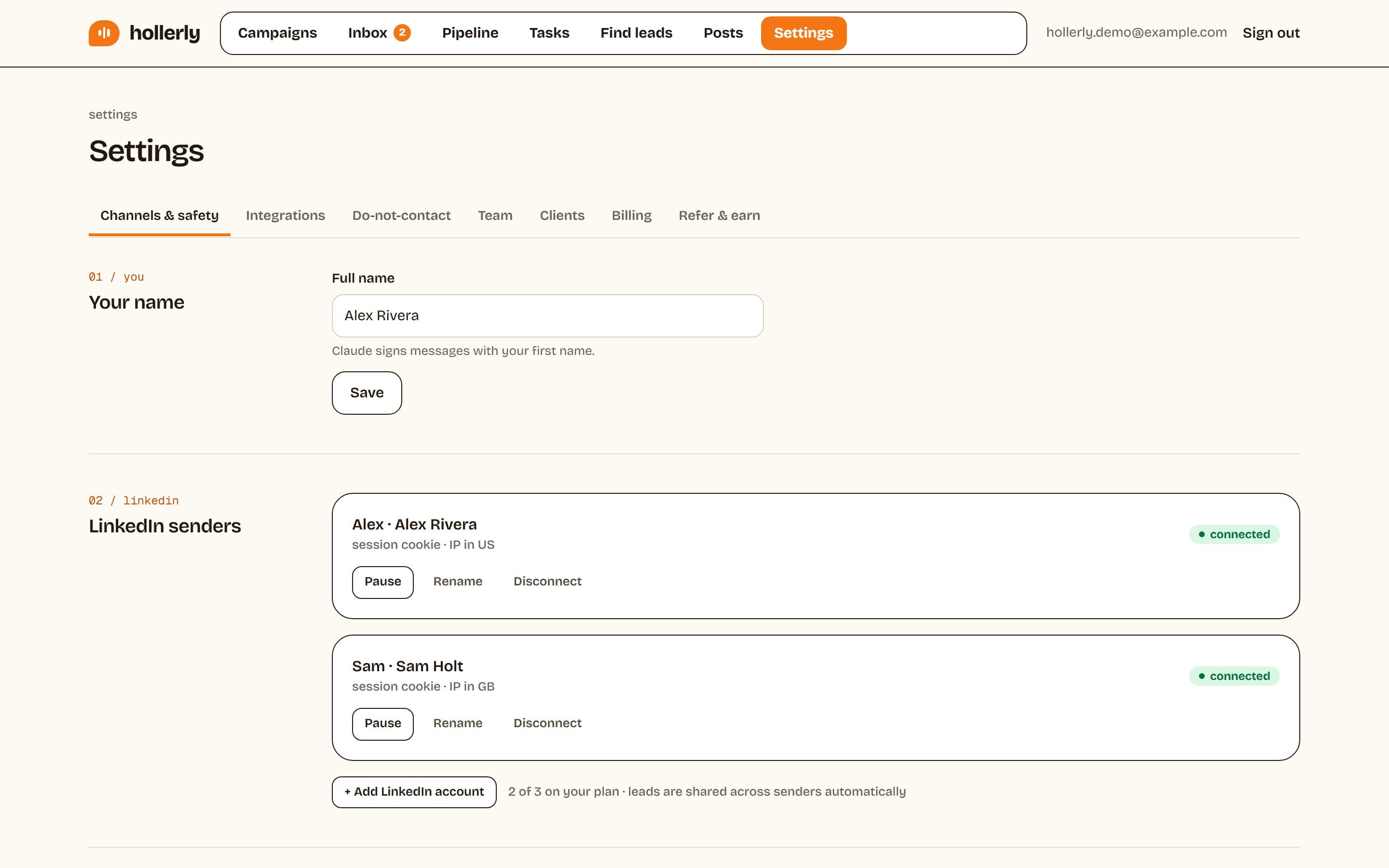
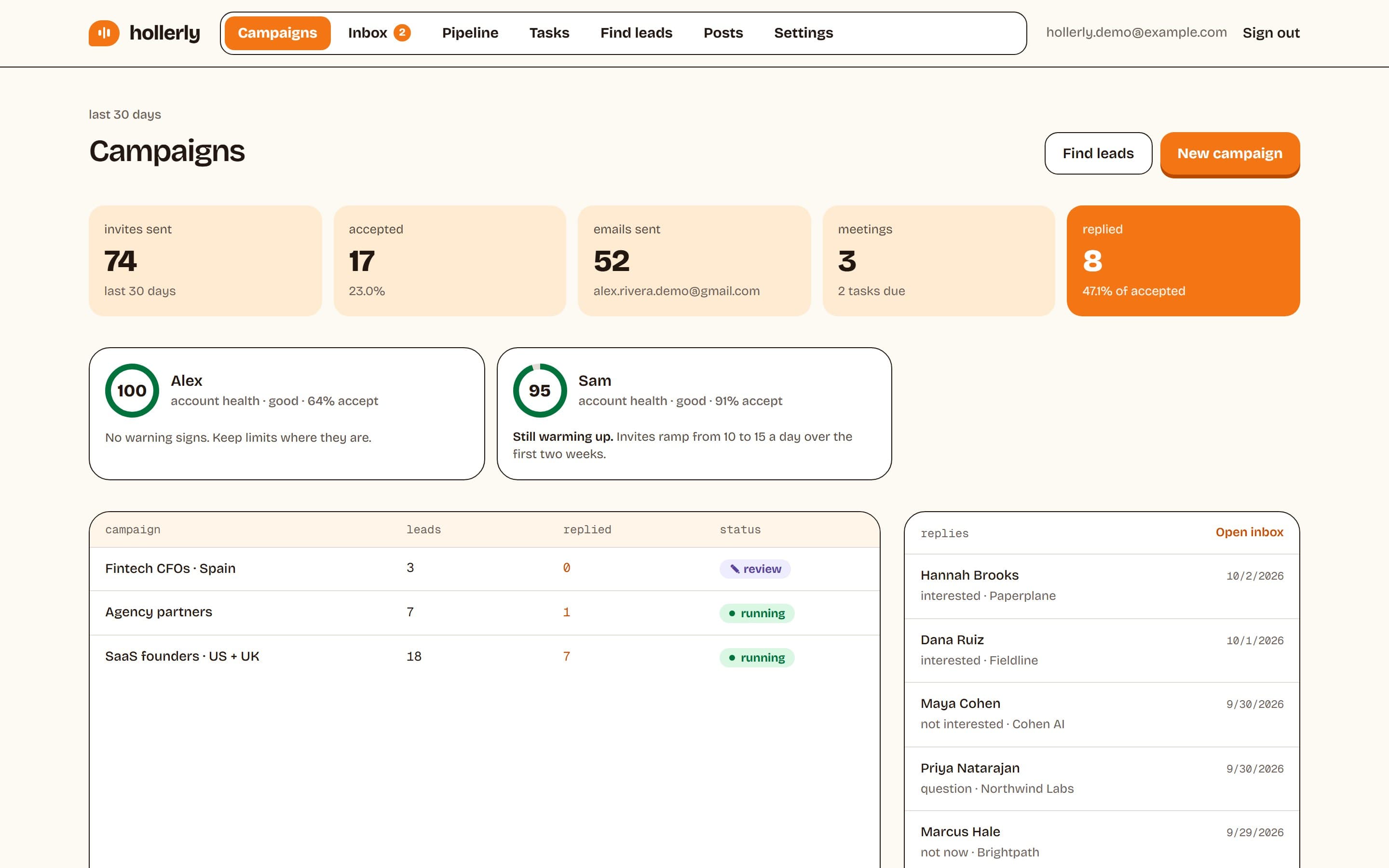
Hollerly runs each LinkedIn account from a dedicated cloud browser with its own IP in your country, during your working hours, whether your computer is on or not. Claude writes each connection note, message and email from the prospect's headline, latest post and company website. You approve the first five, then it runs. New accounts warm up at 10 then 15 invites a day for two weeks, and campaigns pause for 24 hours if LinkedIn shows a rate limit.
Where it fills the Linked Helper gap: no machine, no VPS, no proxy to buy, plus email steps and AI reply handling on Pro. Where it's weaker: it costs more than a Standard license, has fewer action types (visit, like, follow, connect, message, endorse and email), no scraping or contact database, and fewer integrations, with no Salesforce or Zoho.
Key features
- Cloud running with one dedicated browser and IP in your country per account
- AI-written notes, messages and emails researched from each lead's profile, post and company website
- Safety defaults: 20 invites a day, warm-up, working hours, random 45 to 180 second gaps and automatic pauses
- Unified inbox on every plan; AI reply tags and drafts on Pro
- Email steps from your own mailbox, HubSpot and Pipedrive sync on Pro
Pricing (as listed on October 2, 2026)
- Starter: $19 a month, 1 LinkedIn account, 300 connection requests a month
- Pro: $49 a month, email steps, 200 email finder credits, AI reply drafts
- Agency: $69 a month, 3 LinkedIn accounts, 3 seats, API and MCP server
- 7-day free trial of Pro, no card
- ✓Runs with your computer off, no VPS or proxy needed
- ✓AI writes every message from real research
- ✓Email steps and AI reply drafts on Pro
- ✓Published safety defaults and automatic pauses
- ✕Costs more than a Linked Helper Standard license
- ✕Fewer action types and no scraping
- ✕No Salesforce or Zoho sync, fewer integrations
- ✕No contact database or email warmup
2. Dux-Soup
Best for: LinkedIn-only users who want AI personalization and a choice of local or cloud running.
Dux-Soup now sells its product as STACKED, in two versions: a local desktop app for Mac and Windows, and a cloud version that runs with your computer off. It offers up to 12 campaign actions, AI personalization with ChatGPT, Claude or Gemini, a unified response inbox and native CRM integrations.
Dux-Soup gives Linked Helper users a familiar local option plus a cloud upgrade path. Its cloud version costs $99 a seat a month. Hollerly is cloud only, from $19. See the Dux-Soup alternative page.
Key features
- Unlimited concurrent drip campaigns
- Up to 12 actions, including InMail and post likes
- AI personalization with ChatGPT, Claude or Gemini
- Salesforce, HubSpot, Pipedrive and more, plus Zapier and Make
Pricing (as listed on October 2, 2026)
- STACKED Local: $55 a seat a month, or $41.25 billed yearly
- STACKED Cloud: $99 a seat a month, or $74.17 billed yearly
- Free trial terms: not listed
- ✓Cloud option that runs without your computer
- ✓Choice of AI models
- ✓Native Salesforce, HubSpot and Pipedrive
- ✕LinkedIn only
- ✕Cloud costs about 80% more than Local
- ✕Trial terms not stated
3. Octopus CRM
Best for: solo users who want low-cost LinkedIn connection and message automation in the browser.
Octopus CRM is a browser extension for LinkedIn automation: personalized connection requests, bulk messages to 1st-degree connections, profile visits and endorsements, run as campaigns and funnels. It includes a personal CRM dashboard and doesn't ask for your LinkedIn credentials.
Octopus CRM sits in Linked Helper's price range and runs in your browser instead of as desktop software, with far fewer actions and no AI listed. Hollerly costs more but runs in the cloud. See the Octopus CRM alternative page.
Key features
- Automated connection requests and messages
- Profile visits and skill endorsements
- Campaigns and funnels with a personal CRM dashboard
- Zapier, HubSpot, Google Sheets and Zoho
Pricing (as listed on October 2, 2026)
- Starter: $9.99 a month, or $6.99 billed yearly
- Pro: $14.99, Advanced: $21.99, Unlimited: $39.99 a month
- 7-day trial, no card
- ✓Lowest entry price here
- ✓No-card trial
- ✓Doesn't ask for LinkedIn credentials
- ✕Runs in your browser only
- ✕No AI writing or email listed
- ✕Plan limits not published
4. Waalaxy
Best for: solo users and small teams starting LinkedIn prospecting on a small monthly budget.
Waalaxy is a LinkedIn and email outreach tool installed from the Chrome Store, with 99+ ready-made sequences, an email finder and CRM sync. Pro is capped at 300 invites a month and the other plans at 800. Cold email is on the Business plan.
Waalaxy is simpler than Linked Helper: ready-made sequences instead of 30+ actions, and email on its top plan. Hollerly is a similar price and adds cloud running and AI writing. See the Waalaxy alternative page.
Key features
- 99+ ready-to-use sequences and automated follow-ups
- Email finder with 25 to 500 credits a month
- Cold email and LinkedIn plus email campaigns on Business
- API plus Make, Zapier and n8n on Advanced and up
Pricing (as listed on October 2, 2026)
- Pro: €19 a user a month, 300 invites a month
- Advanced: €49, 800 invites a month
- Business: €69, adds cold email
- 14-day free trial on all plans
- ✓€19 monthly entry
- ✓Ready-made sequences
- ✓14-day trial on every plan
- ✕Monthly invite caps
- ✕Email needs the top plan
- ✕Inbox is a paid add-on
5. Dripify
Best for: individual sellers and small teams who want cloud LinkedIn and email sequences priced per seat.
Dripify is a cloud LinkedIn automation tool with a drag-and-drop sequence builder, email steps, 100 email finder credits a month on every plan and AI icebreakers. It publishes daily quotas per plan.
Dripify removes the machine from the equation and adds email steps, at several times Linked Helper's price. Basic allows one campaign. Hollerly is cheaper, with unlimited campaigns and AI-written messages. See the Dripify alternative page.
Key features
- Drag-and-drop sequences with actions and conditions
- Email finder and verification, 100 credits a month
- Inbox on Pro and up; A/B testing on Advanced
- HubSpot, Salesforce, Make, Zapier, webhooks and API
Pricing (as listed on October 2, 2026)
- Basic: $59 a user a month, or $39 billed yearly, 1 campaign
- Pro: $79, or $59 billed yearly
- Advanced: $99, or $79 billed yearly
- 7-day free trial with Advanced features, no card
- ✓Runs in the cloud
- ✓Published daily quotas per plan
- ✓API, webhooks, HubSpot, Make and Zapier
- ✕Basic allows one campaign
- ✕A/B testing only on the $99 tier
- ✕Small email finder allowance
6. Expandi
Best for: agencies and sales teams running LinkedIn-first campaigns who want a dedicated IP and native CRM sync.
Expandi is a cloud LinkedIn automation tool with smart campaigns built from 19 actions and 11 conditions, A/B testing and a smart inbox with labels, tags and notes. Each account gets a dedicated country-based IP and an automatic warm-up.
Expandi has one of the deeper action sets among the cloud tools here, with the IP included rather than bought separately. It costs $99 a month and lists no AI writing. Hollerly is cheaper and writes each message. See the Expandi alternative page.
Key features
- Smart campaigns with 19 actions and 11 conditions
- Dedicated country-based IP and automatic warm-up
- Smart inbox with labels, tags and notes
- Native HubSpot, Salesforce and Pipedrive, plus Zapier, webhooks and API
Pricing (as listed on October 2, 2026)
- Business: $99 a month, or $79 billed yearly
- Agency: custom pricing for 10 or more seats
- 7-day free trial, no card
- ✓Dedicated IP and warm-up included
- ✓Conditional campaigns and A/B testing
- ✓Native HubSpot, Salesforce and Pipedrive
- ✕$99 a month on monthly billing
- ✕No built-in AI writing listed
- ✕No lead database or email finder
7. Closely
Best for: small teams and agencies running LinkedIn plus email from a few accounts who want IPs, warmup and data in one price.
Closely runs LinkedIn and email sequences in the cloud with a dedicated residential IP per LinkedIn account. Every plan includes unlimited email accounts, account warmup and white label, and its smart inbox supports assignment and tagging.
Closely suits Linked Helper users who want the IP included and email added. On annual billing it starts at $39 a month. AI personalization starts on Growth. Hollerly is cheaper on monthly billing and writes with AI from Starter.
Key features
- Dedicated residential IP and LinkedIn warmup per account
- Unlimited email accounts and warmup on every plan
- Smart inbox with assignment and tagging
- Salesforce, HubSpot, Pipedrive and GoHighLevel, plus webhooks
Pricing (as listed on October 2, 2026)
- Starter: $65 a month, or $39 billed yearly, 1 LinkedIn account
- Growth: $159, or $95 billed yearly, 3 accounts
- Essential: $259, or $155 billed yearly, 5 accounts
- Free trial offered; length not stated
- ✓Residential IP and warmup on every plan
- ✓White label on every plan
- ✓Annual billing about 40% below monthly
- ✕Starter has no data or AI credits
- ✕Trial length not stated
- ✕Zapier, Make and API not listed
8. Meet Alfred
Best for: solo users and small teams who want LinkedIn, email and X with social posting at a low per-seat price.
Meet Alfred states it uses cloud-based sending and covers LinkedIn, email and X, plus social scheduling. Email starts on Business, and Salesforce and HubSpot integrations start on its three-seat Teams plan.
Meet Alfred takes the machine out of the picture and adds channels Linked Helper doesn't have. Its displayed prices sit next to an annual toggle, so check monthly billing. Hollerly includes an inbox and AI writing from $19. See the Meet Alfred alternative page.
Key features
- LinkedIn automation for Basic, Premium and Sales Navigator accounts
- Email and X steps on Business and up
- Lead Finder capped at 1,000 to 10,000 results
- White label and CRM integrations on Teams
Pricing (as displayed on October 2, 2026)
- Individual: $29 a user a month
- Business: $49 a user a month
- Teams: $39 a user a month, minimum 3 seats
- Free trial, no card; length not stated
- ✓Cloud-based sending
- ✓LinkedIn, email and X plus social scheduling
- ✓No-card trial
- ✕Monthly-billed prices not clearly shown
- ✕Email needs Business or higher
- ✕CRM integrations start on Teams
Ready to move beyond Linked Helper?
Stay with Linked Helper if you want the most control for the least money and don't mind keeping a machine running. If you'd rather close your laptop and let outreach continue, a cloud tool is worth a trial. Neither setup makes automation risk-free: LinkedIn's user agreement doesn't allow third-party automation, so pacing and limits matter more than where the tool runs. Our guide to the best LinkedIn automation tools covers more options, and Hollerly's plans are on the pricing page.
- Export your leads from Linked Helper's CRM as a CSV with LinkedIn profile URLs and any emails.
- Start a Hollerly trial and connect your LinkedIn account, plus your mailbox for email steps.
- Pick a sequence template, upload the CSV and approve the first five messages.
- Stop the Linked Helper campaign. Hollerly skips duplicates and anyone on your do-not-contact list.
FAQ
+What is the best Linked Helper alternative?
If you want LinkedIn automation that runs without your computer, Hollerly runs in the cloud from $19 a month, with AI-written messages, email on Pro and a unified inbox. Dux-Soup offers a local or cloud choice, and Octopus CRM is the cheapest. Linked Helper stays a good pick if low price and control matter most.
+What is the main difference between Linked Helper and Hollerly?
Linked Helper is desktop software that runs on your computer or a VPS, with 30+ actions and scraping, from $15 a license. Hollerly runs in the cloud with a dedicated browser and IP per account, writes each message with AI, and adds email and AI reply drafts on its $49 Pro plan.
+Can I use Linked Helper and Hollerly together?
Yes, but keep each LinkedIn account in one tool. Two tools acting on the same profile double the activity LinkedIn sees and can trip its limits. Some people keep Linked Helper for scraping and data work and run their outreach sequences from Hollerly in the cloud.
+Which Linked Helper alternative is best for small budgets?
Octopus CRM is the cheapest at $9.99 a month, or $6.99 billed yearly, and runs in your browser. Hollerly Starter at $19 and Waalaxy Pro at €19 cost a little more. Hollerly runs in the cloud and writes messages with AI, so you don't pay for a server.
+Does Linked Helper need my computer to be on?
Yes. Linked Helper runs from the machine you control, so it has to be on with the app running, or you can rent a VPS for 24/7 use. Its Cloud Storage option stores data online, but automation still runs locally. Hollerly runs in the cloud, so campaigns continue when your laptop is closed.
+Is Linked Helper cheaper than Hollerly?
On price alone, usually yes. Linked Helper's Standard license is $15 a month, or as low as $8.25 a month on a 12-month term (checked October 2, 2026). Hollerly Starter is $19 and runs in the cloud, so you don't pay for a server, proxy or keep a computer on.
Get replies without the busywork
Hollerly finds the people, writes every message with AI and follows up on LinkedIn and email until they reply. Runs in the cloud, from $19 a month.
Start my 7-day free trial