Linked Helper Review: Is It Worth It in 2026?
This Linked Helper review covers one of the cheapest and most feature-packed LinkedIn automation tools, with one big trade-off: it is a desktop app. Linked Helper runs on your own computer or on a VPS you control, and your LinkedIn session stays on that machine rather than on Linked Helper's servers.
Below: what the current version does, its key features, what it costs per license, who it suits and who should skip it, and the alternatives. Facts come from Linked Helper's homepage and pricing page, checked October 2, 2026. We do not quote ratings or user reviews.
Linked Helper is one of the cheapest and most feature-packed LinkedIn automation tools, from $15 per license a month or about $8.25 on a 12-month term, with a 14-day Pro trial and no card. The catch is that it is a desktop app: a computer or VPS must stay on, and you buy proxies yourself. Hollerly, Dux-Soup and Expandi are the alternatives to compare if you want cloud running or email steps.
Linked Helper review: verdict at a glance
| Linked Helper | |
|---|---|
| Best for | Technical, budget-minded users and agencies who can keep a computer or VPS running |
| Price | Standard from $15 per license a month, about $8.25 on a 12-month term; Pro price not listed |
| Free trial | 14 days of full Pro access, no credit card, no automatic renewal |
| Runs where | Desktop app on your computer or a VPS |
| Email sending | Not listed (email finding for export only) |
| Our take | More features per dollar than almost any LinkedIn tool, if you are happy to run and maintain the machine it lives on. |
In short: Linked Helper wins on price and depth. You get 30+ action types, AI writing, a built-in CRM and data credits for very little money. You pay for that in setup time: a machine that stays on, a proxy you choose, and updates you install. If that sounds fine, it is excellent value. If you want something that simply runs, a cloud tool will save you time.
Why listen to us?
We build Hollerly, a LinkedIn and email outreach tool, so we know how these products work and where the trade-offs sit. For this review we read Linked Helper's homepage and pricing page on October 2, 2026, and we only state what those pages support. We have not run Linked Helper on a live account for this article, so we make no claims about test results. Where Linked Helper is stronger than Hollerly, we say so, and where a detail was not on its pages, we say that too.
What is Linked Helper?
Linked Helper is LinkedIn automation software with campaigns, scraping, a built-in CRM and AI messaging, sold per LinkedIn account license. Its homepage describes it as a desktop app, not a Chrome extension. You install it on your computer, or on a VPS if you want it running around the clock, and you can control accounts on other PCs remotely.
There are two storage options. Local storage keeps your data on your machine. Cloud storage adds backups, multi-device access, team sharing and incoming webhooks, but the automation itself still runs on your machine.
| Linked Helper | Hollerly | |
|---|---|---|
| Where it runs | Your computer or your VPS | Hollerly's cloud |
| Needs your computer on | Yes (or a VPS) | No |
| Proxy per account | One proxy, one account (you buy it) | Dedicated IP in your country, included |
| AI-written messages | Yes (AI credits) | Every plan |
| AI ICP detection | Yes | AI ideal customer profile and lead scoring |
| Built-in CRM | Yes, with tags and notes | Notes, tags, tasks; pipeline board on Pro |
| Data enrichment | Emails, phones, 50+ data points (credits) | Email finder: 200 credits/mo on Pro |
| Email sending | Not listed | Pro, from your own mailbox |
| Entry price | $15/license/mo (Standard, local) | $19/mo |
Linked Helper 2 review: what changed
Many people search for a Linked Helper 2 review because the current generation of the app goes well beyond the original. Based on the homepage, the main additions are AI features (AI messages, AI ICP detection, AI comments and an AI reply assistant), a built-in CRM, data enrichment with credits, and workspaces with Owner, Admin, Member and Guest roles for teams.
What did not change is the architecture. Linked Helper 2 is still a standalone desktop app, not a cloud service or browser extension. That gives you control and a low price, but you run and maintain the machine it lives on.
Linked Helper key features
Campaigns with 30+ action types
Campaigns combine profile visits, connection requests, message sequences and follow-ups, with reply detection that stops automatic messages once someone answers. The action list is long. Beyond likes and endorsements, Linked Helper can invite connections to a LinkedIn event or webinar, to join a group, or to follow your company page. Few tools offer those.
Built-in AI with credits
AI is built in, so you do not need your own ChatGPT subscription. AI messages read each lead's profile and write an invite or follow-up. AI ICP detection checks every profile against a plain-words description of your ideal customer. AI comments write a reply to a post, and the reply assistant suggests your next message. Usage draws on AI credits: 250 to 1,500 on Standard depending on term, and up to 3,000 on Pro.
Built-in CRM and inbox
Linked Helper keeps contacts in its own CRM with tags, notes and an inbox, and scrapes chats so you can manage replies. For a desktop tool, that is a useful amount of organization without exporting to another system.
Scraping and data enrichment
You can scrape profiles, companies and company employees, and enrich a profile URL with verified emails, phone numbers and more than 50 data points. Standard includes 620 data credits a month and Pro 3,100. Extra credits can be bought and never expire, though their prices are not listed.
Integrations and teams
The integration list is long: HubSpot, Salesforce, Pipedrive, Zoho, ActiveCampaign, Close, Capsule, Streak, HighLevel, Instantly, Apollo.io and Google Sheets, plus Zapier, Make, n8n and webhooks. Workspaces with roles make it practical for agencies running many accounts.
Safety controls
Linked Helper's safety approach comes from being local. It lists randomized delays, natural browsing and mouse movement, rolling 24-hour limits and a "one proxy, one account" setup with a built-in proxy check, and says your LinkedIn session never reaches its servers. Getting this right depends partly on you: a good proxy, current updates and sensible limits. LinkedIn's user agreement does not allow third-party automation, so the risk is never zero. Our LinkedIn automation safety guide explains the limits Hollerly applies by default.
Linked Helper pricing
| Term | Per license per month |
|---|---|
| 1 month | $15.00 |
| 3 months | $13.33 |
| 6 months | $10.05 |
| 12 months | $8.25 |
Standard with cloud storage starts "from $16.50 / month" on the longest term; the one-month cloud price was not listed. Pro prices were not listed on the page we checked, so check the calculator on Linked Helper's pricing page for current figures. Pro removes the 20-a-day caps on eleven advanced actions and adds message history export.
Volume discounts start at 10% for 10 to 19 licenses and reach 50% at 1,000 or more, stacked with term discounts. The costs to budget beyond the license are a proxy for each account, and a VPS if you want campaigns running while your own computer is off. Our Linked Helper pricing breakdown has worked examples. Hollerly runs in the cloud from $19 a month, with the IP included. See Hollerly pricing.
Linked Helper pros and cons
- ✓Very low price, from about $8.25 a license on a 12-month term.
- ✓30+ action types, including event, group and company page invites.
- ✓Built-in AI messages, ICP detection, comments and reply assistant.
- ✓Built-in CRM, scraping and data enrichment credits.
- ✓14-day trial of full Pro access, no card, no auto-renewal.
- ✕Desktop app: campaigns stop when your computer or VPS is off.
- ✕Proxies and VPS are bought and managed separately.
- ✕Standard caps eleven advanced actions at 20 a day.
- ✕Pro prices not shown clearly on the pricing page.
- ✕No email sending listed.
Who Linked Helper is for, and who should skip it
Linked Helper is a good fit for:
- Technical users who want maximum control and are comfortable with a desktop app or VPS.
- Budget-minded users who can commit to a 6 or 12-month term.
- Agencies running many accounts, where volume discounts and workspace roles help.
- Power users who want unusual actions such as event, group or company page invites.
Consider something else if:
- You want campaigns to run without any machine or proxy to maintain.
- You want email follow-ups sent from the same tool.
- You want a clear Pro price before you start.
During the 14-day trial, test on the machine you plan to use long term, set up the proxy you will keep, and note which advanced actions you use. If you need more than 20 a day of any capped action, you need Pro.
Linked Helper alternatives
If running a desktop app is the deal breaker, or you need email steps, these are the tools to compare.
| Tool | Best for | Starting price | Runs where | Email steps |
|---|---|---|---|---|
| Hollerly | Cloud LinkedIn outreach with AI messages and email follow-up | $19/mo | Cloud | Pro ($49) |
| Dux-Soup (STACKED) | Strong CRM sync, desktop or cloud | $55/seat/mo | Desktop app or cloud | Not listed |
| Expandi | Dedicated IP per account | $99/mo ($79 annual) | Cloud | Yes |
| HeyReach | Agencies with many LinkedIn senders | $79/sender/mo | Not stated | Through Instantly, Smartlead or EmailBison |
1. Hollerly
Best for: people who want Linked Helper's AI features without a desktop app or a proxy to manage.
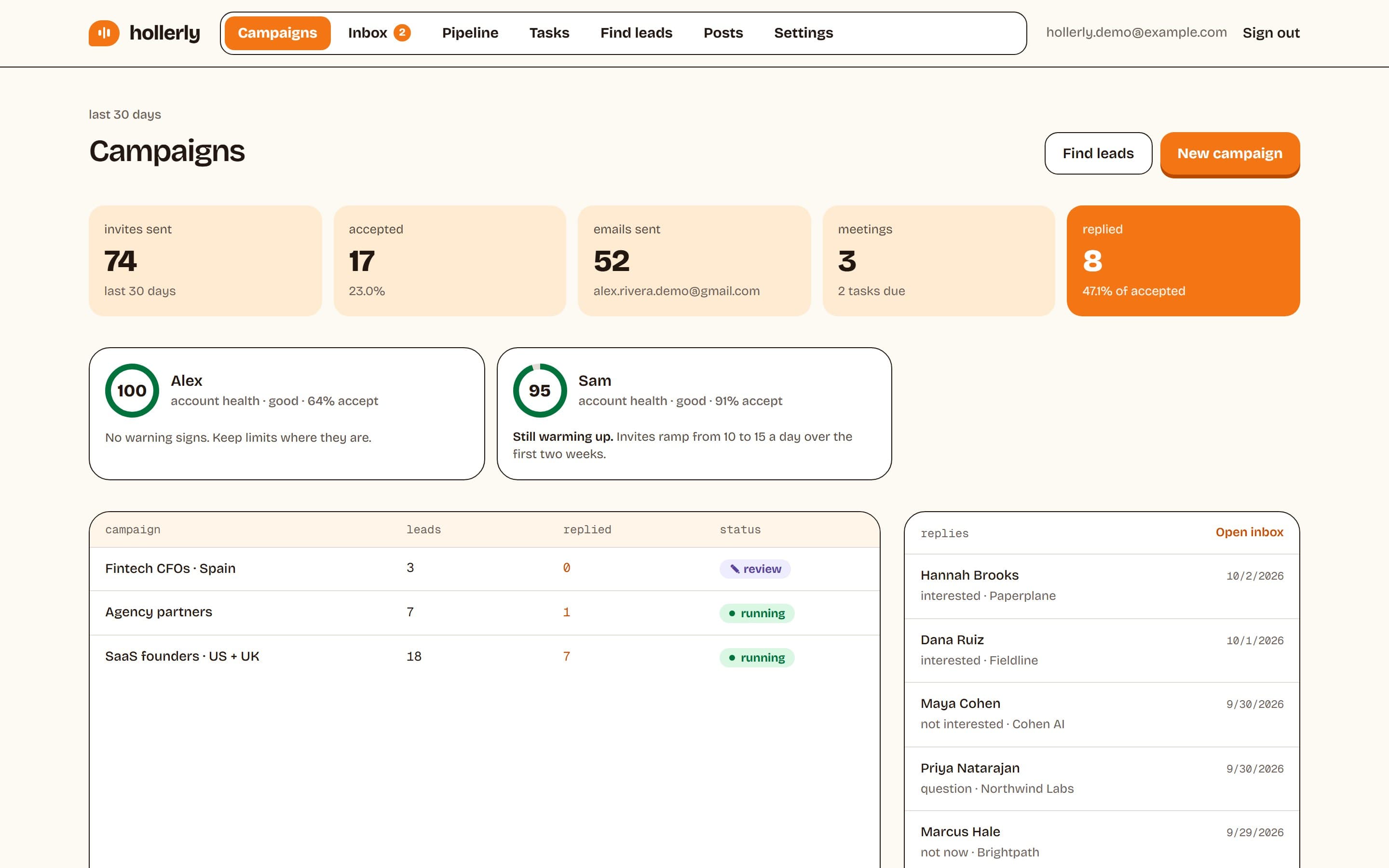
Hollerly runs each LinkedIn account from one dedicated cloud browser with its own IP in your country, included in the price. Claude writes every note, message and email from the lead's profile, latest post and company website, and you approve the first five before the campaign runs. Daily caps, working hours, random gaps between actions and an automatic pause on LinkedIn warnings are set for you. On Pro, follow-ups go out by email from your own mailbox, and replies on either channel stop the sequence.
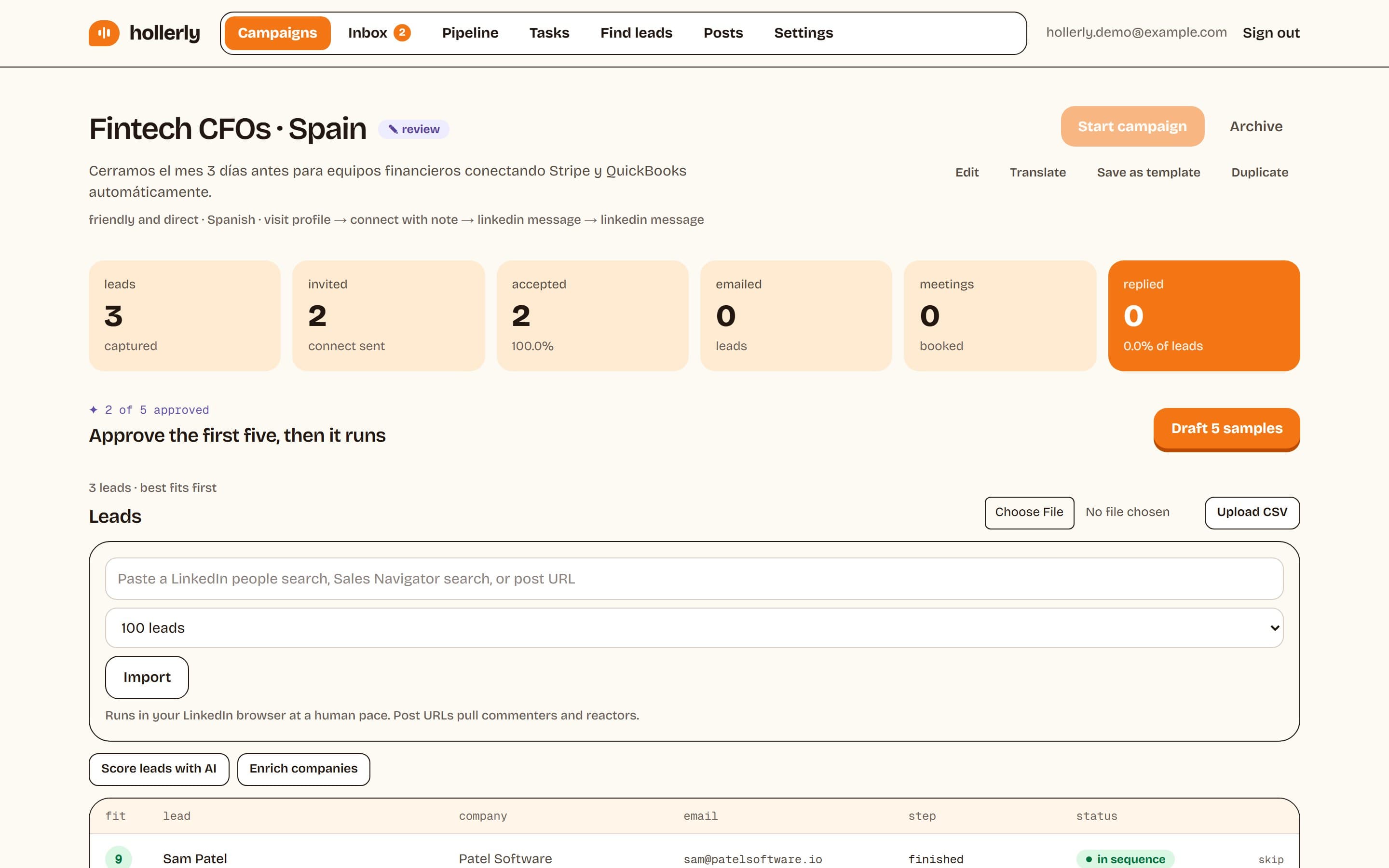
Where Linked Helper is stronger: price on long terms, a wider set of engagement actions, deeper scraping and enrichment, a longer integration list, and full local control of your data. Hollerly is also a newer product and has no B2B contact database.
Key features
- Cloud running with a dedicated IP, no computer or VPS needed.
- AI-written messages and an AI ideal customer profile with lead scoring.
- Email from your own Gmail, Outlook or SMTP mailbox on Pro.
- Unified inbox with AI reply tags and drafts on Pro.
- Account health score and automatic pauses on LinkedIn warnings.
Pricing (as listed on October 2, 2026): Starter $19/mo, Pro $49/mo, Agency $69/mo with 3 LinkedIn accounts, and a 7-day free trial of Pro with no card. See the Linked Helper alternative page.
2. Dux-Soup (STACKED)
Best for: LinkedIn-only teams that want native Salesforce sync and a choice of desktop or cloud. STACKED Local costs $55 a seat a month and Cloud $99, or 25% less on annual billing. Cloud runs without your computer. See our Dux-Soup review.
3. Expandi
Best for: teams that want a cloud tool with a dedicated, country-based IP per account and automatic warm-up. Expandi's Business plan is $99 a month or $79 on annual billing, with email steps, native CRM sync and a 7-day trial with no card.
4. HeyReach
Best for: agencies sending from many LinkedIn accounts. Growth is $79 per sender a month with a residential proxy per sender, and Agency is $999 a month for 25 senders. Email runs through Instantly, Smartlead or EmailBison. See our HeyReach review.
Verdict: is Linked Helper worth it?
Linked Helper gives you more features per dollar than almost any LinkedIn tool. If you are technical, happy to run a desktop app or VPS, and willing to buy your own proxy, it is excellent value, and the 14-day Pro trial with no card makes it easy to check. If you want campaigns that run in the cloud without any setup, or email steps in the same sequence, a cloud tool will cost a little more and save you time.
FAQ
+Is Linked Helper a desktop app?
Yes. Linked Helper is a standalone desktop application that runs on your own computer or on a VPS you control, and your LinkedIn session stays on that machine. Campaigns only run while it is on. Cloud storage is available for backups and team sharing, but the automation still runs locally.
+What is Linked Helper 2?
Linked Helper 2 is the current generation of the Linked Helper desktop app. It adds AI messages, AI ICP detection, AI comments and a reply assistant to campaign automation, plus a built-in CRM, data enrichment credits and team workspaces with Owner, Admin, Member and Guest roles.
+Is Linked Helper safe?
Linked Helper uses randomized delays, human-like browsing, rolling daily limits and one proxy per account, and keeps your session on your own machine. Safety also depends on your proxy and settings. No tool is risk-free, because LinkedIn's user agreement does not allow third-party automation.
+How much does Linked Helper cost?
Standard with local storage costs $15 per license a month, $13.33 on 3 months, $10.05 on 6 months and $8.25 on 12 months, as listed on October 2, 2026. Cloud storage starts from $16.50 a month. Pro prices were not listed, so check Linked Helper's pricing calculator.
+What is the main difference between Linked Helper and Hollerly?
Linked Helper is a desktop app that runs on your computer or VPS with a proxy you buy, and it is cheaper with more LinkedIn actions. Hollerly runs in the cloud with a dedicated IP included, writes every message with AI and adds email from your own mailbox on its $49 Pro plan.
+Which Linked Helper alternative is best for small budgets?
If you want cloud running instead of a desktop app, Hollerly starts at $19 a month with the IP included and a 7-day free trial of Pro. If you are happy with a desktop app, Linked Helper itself is usually the cheapest option, especially on a 12-month term.
Get replies without the busywork
Hollerly finds the people, writes every message with AI and follows up on LinkedIn and email until they reply. Runs in the cloud, from $19 a month.
Start my 7-day free trial