Dripify vs Octopus CRM: Which LinkedIn Tool Should You Pick?
Dripify vs Octopus CRM is a choice between a fuller cloud sequencer and a budget browser tool. Octopus CRM costs $9.99 to $39.99 a month, or $6.99 to $24.99 billed yearly, and runs as a Chrome extension that automates invitations, bulk messages, profile visits and endorsements. Dripify costs $59 to $99 a user per month, or $39 to $79 billed yearly, runs in the cloud and adds email steps, an inbox from Pro and A/B tests on Advanced.
Below we compare both on features, pricing, safety, ease of use, integrations and support, using only what each vendor published on its own site on October 2, 2026. Where a detail was missing, we say so.
Octopus CRM wins on price: its most expensive plan costs less than Dripify's cheapest, which suits solo users doing simple LinkedIn tasks from Chrome. Dripify wins on capability, with cloud running, email steps, an inbox and published daily quotas. People look elsewhere when they want cloud running and AI-written LinkedIn and email outreach for less than Dripify, which is where Hollerly fits from $19 a month.
Dripify vs Octopus CRM at a glance
| Dripify | Octopus CRM | |
|---|---|---|
| Best for | Individuals and small teams running LinkedIn plus email sequences | Solo users who want the cheapest LinkedIn automation |
| Starting price | $59/user/mo, or $39 billed yearly (Basic) | $9.99/mo, or $6.99 billed yearly (Starter) |
| Free trial | 7 days with Advanced features, no card | 7 days, no card |
| Cloud or extension | Cloud web app | Chrome extension |
| Email included | Yes, every plan | No email sequences listed |
| LinkedIn accounts | 1 per seat | Not listed per plan |
| Standout feature | Published daily quotas and an inbox from Pro | Endorsements, profile visits and a personal CRM |
The price gap is large, and it reflects a real difference in what you get. Dripify is a multichannel sequencer that runs without your browser. Octopus CRM is a low-cost set of LinkedIn shortcuts that lives in Chrome.
Why listen to us?
We build Hollerly, a LinkedIn and email outreach tool, so we know this category well and we compete with both tools. We only use facts each vendor published on its own site, checked on October 2, 2026, and we flag what was missing. We have not run paid accounts on Dripify or Octopus CRM, so we make no claims about test results, and we say clearly where each is stronger than Hollerly.
What is Dripify?
Dripify is a cloud LinkedIn automation tool for multi-step LinkedIn and email outreach, run from its web app. It is priced per user, with one LinkedIn account per seat, and its plans differ by campaigns, daily quotas and team features.
Key features
- Sequence builder: drag-and-drop campaigns with actions and conditions.
- Email finder and verification: 100 credits a month on every plan, with credit packs to buy more.
- Lead enrichment: 30+ real-time data attributes per lead.
- Smart variables: 20+ variables, including AI icebreakers.
- Inbox: a dedicated inbox for lead replies from Pro.
- Testing and teams: A/B tests, lead tagging, step analytics and multi-team management on Advanced.
- Integrations: CSV export, webhooks, open API and HubSpot from Pro.
Pricing
| Plan | Monthly | Billed yearly | Highlights |
|---|---|---|---|
| Basic | $59 | $39 | 1 campaign; 20 connection requests and 30 messages a day |
| Pro | $79 | $59 | Unlimited campaigns; 75 connection requests and 100+ messages a day |
| Advanced | $99 | $79 | Pro quotas plus advanced LinkedIn protection, A/B tests, teams |
| Enterprise | Contact sales | Contact sales | Premium onboarding, dedicated support, success manager |
Extra email finder credits cost $29 for 1,000, $49 for 2,000, $69 for 5,000 and $99 for 10,000.
- ✓Runs in the cloud from a web app
- ✓7-day trial with Advanced features, no card
- ✓API, webhooks, HubSpot, Make and Zapier
- ✓Published daily quotas per plan
- ✕Basic is capped at 1 campaign
- ✕Small email finder allowance of 100 a month
- ✕A/B testing only on the $99 tier
- ✕Much more expensive than Octopus CRM
What is Octopus CRM?
Octopus CRM is a LinkedIn automation tool that runs as a Chrome extension in your browser. Its homepage describes it as the safest LinkedIn automation tool on the market, which is the vendor's own claim and not something we can verify. It handles everyday LinkedIn jobs, connecting, messaging, visiting profiles and endorsing skills, with a small CRM dashboard.
Key features
- Personalized connection requests: invitations with your own note, sent automatically.
- Bulk messaging: messages your first-degree connections in one go.
- Profile visits and endorsements: visits profiles and endorses up to 7 skills per profile.
- Campaigns and funnels: chains actions into simple sequences.
- Personal CRM: a dashboard with stats, plus CSV import and export.
- Connect by Email: an option for working around LinkedIn's weekly invite limit.
- Activity control: alerts when it detects excessive activity on your account.
Pricing
| Plan | Monthly billing | Billed yearly |
|---|---|---|
| Starter | $9.99 | $6.99 |
| Pro | $14.99 | $9.99 |
| Advanced | $21.99 | $14.99 |
| Unlimited (recommended) | $39.99 | $24.99 |
Yearly billing is shown as 35% off. The homepage does not say what changes between plans, such as seats, credits or limits, and the separate pricing URL returned an error when we checked. Ask Octopus CRM which tier you need.
- ✓Lowest entry price we found: $6.99 a month billed yearly
- ✓7-day trial with no card
- ✓Does not ask for your LinkedIn login details
- ✓HubSpot and Zapier connections
- ✕Browser extension only; no cloud option listed
- ✕Plan differences and limits not published
- ✕No AI writing or email sending listed
- ✕LinkedIn only
Features compared
Both send connection requests and messages in multi-step campaigns. Octopus CRM adds LinkedIn actions Dripify does not list, such as skill endorsements and bulk messages to existing connections, plus a personal CRM dashboard on every plan.
Dripify goes further in other directions: email steps in the same sequence, an email finder with 100 credits a month, 30+ enrichment attributes, AI icebreakers, InMail quotas, an inbox from Pro and A/B tests on Advanced.
AI is another difference. Dripify lists AI icebreakers among its smart variables. Octopus CRM does not list AI writing, so every template is yours to write. If you want whole messages drafted from each lead's profile, neither tool lists that today.
Winner: Dripify, for multichannel sequences and reply handling. Octopus CRM if endorsements and your existing network are the focus.
Pricing compared
Octopus CRM's most expensive plan costs less than Dripify's cheapest. What Dripify adds for the money is cloud running, email, an inbox and team features.
Worked example: one user for a year
- Octopus CRM Starter, billed yearly: $83.88.
- Octopus CRM Unlimited, billed yearly: $299.88.
- Dripify Basic, billed yearly: $468.
- Dripify Pro, billed yearly: $708; on monthly billing, $948 over 12 months.
Remember that Dripify Basic allows only one campaign. Most active users will need Pro, so compare Octopus CRM against $59 to $79 a month, not $39.
Winner: Octopus CRM, by a wide margin.
Safety and account limits
LinkedIn's user agreement does not allow third-party automation, so both tools carry risk. No tool can promise an account will never be restricted.
Dripify
Dripify publishes daily quotas by plan: 20 connection requests and 30 messages on Basic, 75 connection requests and 100 or more messages on Pro and Advanced. It lists built-in LinkedIn protection on all plans and advanced protection on Advanced, without describing delays or IPs.
Octopus CRM
Octopus CRM lists activity alerts, says it does not ask for your LinkedIn credentials and works within LinkedIn's weekly invite limit. It does not describe delays or proxies, and plan limits were not published.
Treat any published maximum as a ceiling. On a new account, start well below it and raise volume slowly while watching acceptance rates and pending invites.
Winner: Dripify, for publishing exact quotas. Our LinkedIn automation safety guide lists daily numbers that work with any tool, and why Hollerly does not use a Chrome extension explains how cloud and extension tools differ.
Ease of use
Octopus CRM is quick to start: install the extension, build a funnel and track results in the CRM dashboard. There is little to configure. Dripify takes a little longer because it does more, but the drag-and-drop builder and the inbox keep everyday work in one place, and campaigns run without your browser open.
One thing to check during the Octopus CRM trial: an extension works through your browser, and the pages we checked do not say whether Chrome must stay open for campaigns to keep running.
Winner: a tie. Octopus CRM is simpler; Dripify does more without getting complicated.
Integrations and support
Dripify lists HubSpot from Pro, Salesforce, Make, Zapier, Google Sheets, webhooks and an open API from Pro, with premium onboarding, dedicated support and a success manager on Enterprise. Octopus CRM lists Zapier, HubSpot, Google Sheets, Google Docs, Zoho and Asana; its support terms were not listed.
Winner: Dripify, for its API, webhooks and Salesforce.
Which one should you choose?
Choose Octopus CRM if you want inexpensive LinkedIn automation for one profile, value endorsements and messaging your network, and are fine running it from Chrome.
Choose Dripify if you want cloud-run LinkedIn and email sequences, an inbox for replies, published quotas and features for a team.
Both offer 7-day trials with no card. Compare more tools in our Dripify alternative and Octopus CRM alternative guides.
A third option: Hollerly
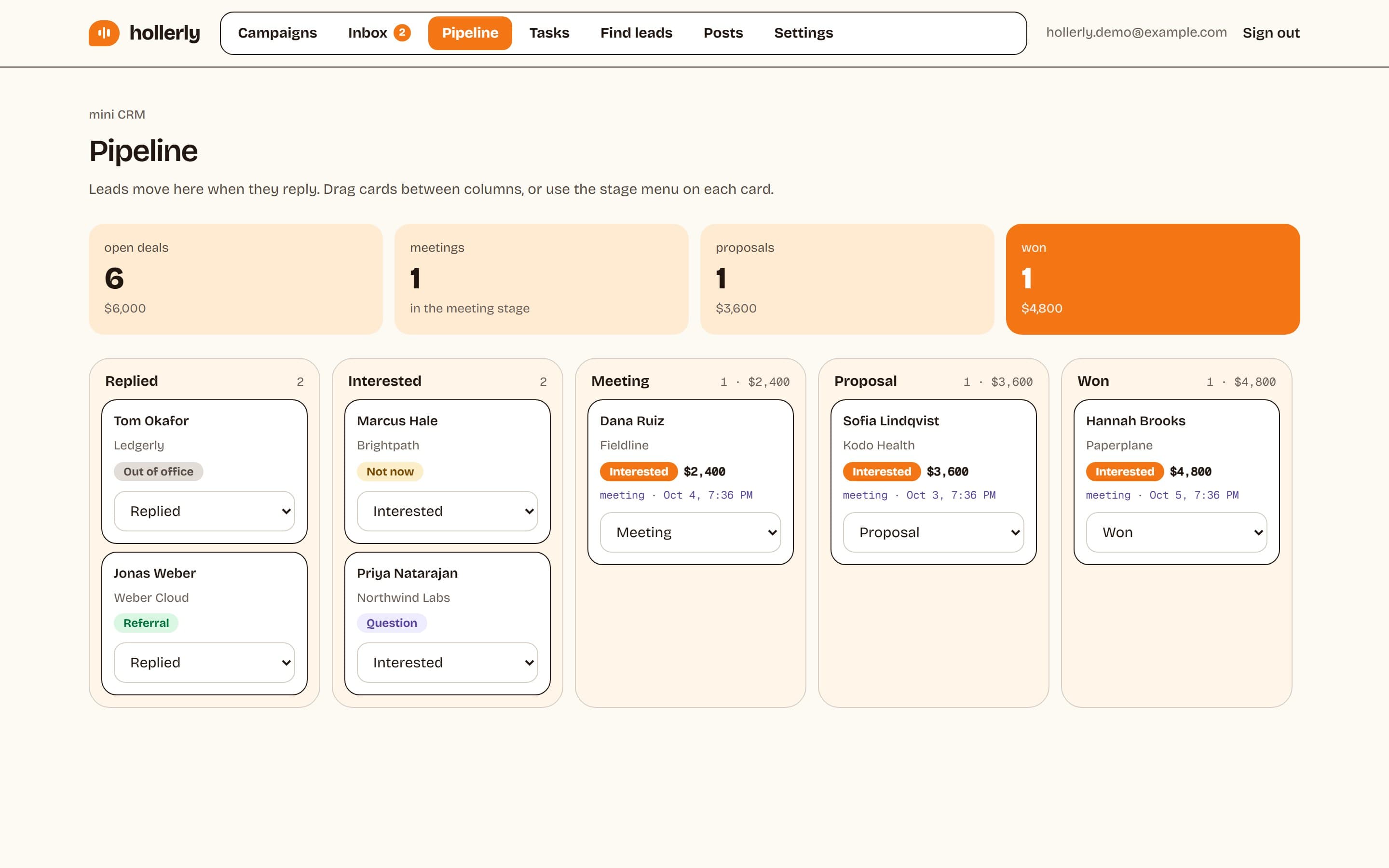
Hollerly sits between the two on price. Like Dripify, it runs LinkedIn and email sequences in the cloud with an inbox. Unlike Octopus CRM, it needs no extension: your account runs in a dedicated cloud browser with its own IP in your country. Claude writes each note, message and email from the lead's profile, latest post and company website, and replies from both channels land in one inbox, tagged by intent.
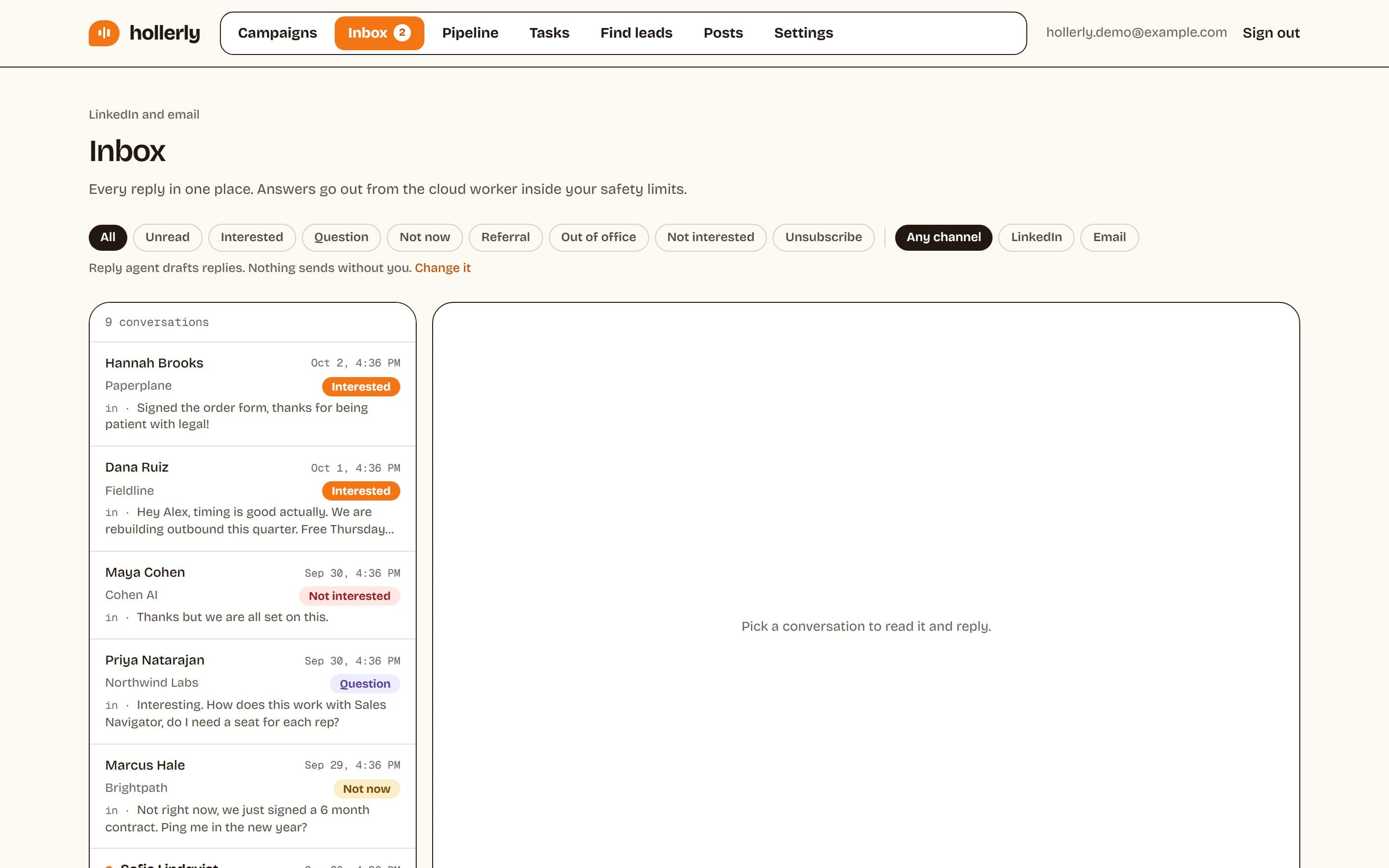
- Starter, $19 a month: cloud running, AI-written messages, unlimited campaigns and a unified inbox.
- Pro, $49 a month: email from your own mailbox, AI reply tagging and drafts, A/B tests and a pipeline board, less than Dripify Basic on monthly billing.
- Safety built in: daily caps, working hours, random gaps between actions and automatic pauses on warnings.
Where Hollerly is weaker: Octopus CRM is cheaper and lists automated endorsements. Hollerly has no B2B contact database, no email warmup, and no calls, SMS or WhatsApp, and as a newer product it has fewer integrations than older tools. Details are on the pricing page.
FAQ
+Is Octopus CRM cheaper than Dripify?
Yes, by a wide margin. Octopus CRM runs from $9.99 to $39.99 a month, or $6.99 to $24.99 billed yearly. Dripify runs from $59 to $99 per user a month, or $39 to $79 yearly. Dripify includes email steps and an inbox, which Octopus CRM does not list.
+Does Octopus CRM send emails?
Not as outreach sequences. Octopus CRM lists a Connect by Email option for sending LinkedIn connection requests using an email address, but no email campaigns. Dripify includes email steps on all plans, and Hollerly sends email from your own Gmail, Outlook or SMTP mailbox on its $49 Pro plan.
+What is the main difference between Dripify and Octopus CRM?
Dripify is a cloud sequencer for LinkedIn and email, with an inbox, published daily quotas and team features, priced per user from $39 to $99. Octopus CRM is a low-cost Chrome extension for LinkedIn tasks such as invitations, bulk messages and endorsements, priced from $6.99 to $39.99 a month.
+Does Dripify need a Chrome extension?
Dripify runs from its web app, and its pages describe it as cloud LinkedIn automation; they do not mention an extension. Octopus CRM, by contrast, runs as a Chrome extension. Hollerly also needs no extension: each LinkedIn account runs from a dedicated cloud browser with its own IP in your country.
+Is Octopus CRM safe to use?
Octopus CRM lists activity alerts and says it never asks for your LinkedIn login, which reduces some risks. But LinkedIn's user agreement does not allow third-party automation, so no tool is risk-free. Keep daily invitations modest, write personal notes, and slow down if your acceptance rate drops.
+Which is better for a small budget, Dripify or Octopus CRM?
Octopus CRM, if you only need LinkedIn tasks: it starts at $6.99 a month billed yearly. If you want cloud running, email steps and an inbox without paying Dripify's $59 to $79, Hollerly Starter costs $19 a month and Pro, with email from your own mailbox, costs $49.
Get replies without the busywork
Hollerly finds the people, writes every message with AI and follows up on LinkedIn and email until they reply. Runs in the cloud, from $19 a month.
Start my 7-day free trial