Octopus CRM vs Waalaxy: Which LinkedIn Tool Should You Pick?
Octopus CRM vs Waalaxy is a choice between two of the cheapest LinkedIn automation tools you can buy in 2026. Octopus CRM is a Chrome extension that starts at $9.99 a month, or $6.99 billed yearly, and covers invitations, bulk messages, profile visits and endorsements. Waalaxy starts at €19 per user a month for 300 invitations and grows into API access at €49 and cold email at €69.
Below we compare both on features, pricing, safety, ease of use, integrations and support. Every fact comes from the vendors' own sites as they read on October 2, 2026. Where a vendor did not publish a detail, we say so instead of guessing.
Octopus CRM wins on price: it is the cheapest way to automate basic LinkedIn tasks, as long as you are happy working from a browser extension. Waalaxy wins on room to grow, with email finder credits, an API and cold email on higher plans. People look past both when they want campaigns that run in the cloud with AI-written messages, which is where Hollerly fits from $19 a month.
Octopus CRM vs Waalaxy at a glance
| Octopus CRM | Waalaxy | |
|---|---|---|
| Best for | Solo users who want the cheapest LinkedIn automation | Solo users and small teams starting LinkedIn prospecting |
| Starting price | $9.99/mo, or $6.99/mo billed yearly | €19/user/mo (Pro) |
| Free trial | 7 days, no card | 14 days on every plan |
| Cloud or extension | Chrome extension | Chrome extension (Chrome Store listing shown) |
| Email included | No email sequences listed | Cold email on Business (€69) |
| LinkedIn accounts | Not listed per plan | Priced per user; account limits not listed |
| Standout feature | Endorsements, profile visits and a personal CRM | 99+ ready-made sequences and a path to email |
Both tools are browser based and priced for individuals. The real difference is scope. Octopus CRM stays inside LinkedIn and keeps the price very low. Waalaxy starts at roughly double the price and adds email, data credits and automation hooks as you move up its plans.
Why listen to us?
We build Hollerly, a LinkedIn and email outreach tool, so we know this category well and we have a stake in it. That is why we only use facts we could check. For this page we read each vendor's own pricing and product pages on October 2, 2026, and we flag anything they did not publish. We have not run paid accounts on these tools, so we make no claims about test results, and we say plainly where each competitor is stronger than Hollerly.
What is Octopus CRM?
Octopus CRM is a LinkedIn automation tool that runs as a Chrome extension in your browser. Its homepage describes it as the safest LinkedIn automation tool on the market, which is the vendor's own claim and not something we can verify. It handles the everyday LinkedIn jobs: connecting, messaging people you already know, visiting profiles and endorsing skills, with a small CRM dashboard on top.
Key features
- Personalized connection requests: sends invitations with your own note automatically.
- Bulk messaging: messages your first-degree connections in one go.
- Profile visits and endorsements: visits profiles and endorses up to 7 skills per profile.
- Campaigns and funnels: chains those actions into simple sequences.
- Personal CRM: a dashboard with stats on contacts and campaigns, plus CSV import and export.
- Connect by Email: an option for working around LinkedIn's weekly invite limit.
- Activity control: alerts you when it detects excessive activity on your account.
Pricing
| Plan | Monthly billing | Billed yearly |
|---|---|---|
| Starter | $9.99 | $6.99 |
| Pro | $14.99 | $9.99 |
| Advanced | $21.99 | $14.99 |
| Unlimited (recommended) | $39.99 | $24.99 |
Yearly billing is shown as 35% off. The homepage does not say what changes between plans, such as seats, credits or limits, and the separate pricing URL returned an error when we checked. Ask Octopus CRM which tier you need before you pay.
- ✓Lowest entry price we found: $6.99 a month billed yearly
- ✓7-day trial with no card
- ✓Does not ask for your LinkedIn login details
- ✓HubSpot and Zapier connections
- ✕Browser extension only; no cloud option listed
- ✕Plan differences and limits not published
- ✕No AI writing or email sending listed
- ✕LinkedIn only
What is Waalaxy?
Waalaxy is a LinkedIn and email prospecting tool built to get campaigns running quickly. It shows a Chrome Store listing and is priced per user. You pick from more than 99 ready-to-use sequences, import leads and let invitations and follow-ups run. Higher plans add email finder credits, an API and cold email steps in the same campaign.
Key features
- Ready-made sequences: 99+ outreach sequences with automated follow-ups.
- Prospect finding: find and import leads from LinkedIn.
- Email finder: 25 to 500 credits a month; Waalaxy states a match rate of 61% or more.
- Reply tracking and dashboards: see who answered and how campaigns perform.
- CRM sync: HubSpot and Pipedrive, plus CSV import and export.
- Cold email: email sequences and LinkedIn plus email campaigns on Business.
- API and automation: API plus Make, Zapier and n8n modules from Advanced.
Pricing
| Plan | Price | Invitations | Email credits | Extras |
|---|---|---|---|---|
| Pro | €19 | 300 a month | 25 a month | Unlimited campaigns, CRM sync |
| Advanced | €49 | 800 a month | 500 a month | API, Make, Zapier, n8n |
| Business | €69 | 800 a month | 500 a month | Cold email, multichannel campaigns, priority support |
Waalaxy shows quarterly billing as 20% off and yearly billing as 50% off, but it does not list the discounted amounts. The LinkedIn Inbox is a separate add-on with 500 free conversations to try; its paid price was not shown. An AI assistant for prospects and messages is labeled "soon".
- ✓€19 a month entry price
- ✓14-day trial on every plan
- ✓API plus Make, Zapier and n8n on Advanced
- ✓Large advertised yearly discount
- ✕Monthly invite caps of 300 or 800
- ✕Email needs the €69 Business plan
- ✕Inbox add-on price not shown
- ✕AI assistant not available yet
Features compared
Both tools send connection requests and follow-up messages, which is what most buyers need. After that they split. Octopus CRM leans into LinkedIn-only actions that Waalaxy does not list, such as skill endorsements, bulk messages to existing connections and a personal CRM dashboard.
Waalaxy leans into prospecting as a process. It gives you a library of ready sequences, an email finder, reply tracking and, on Business, cold email in the same campaign. Neither vendor lists AI-written messages today; Waalaxy's AI assistant is marked as coming soon.
Winner: Waalaxy, for range. Pick Octopus CRM if endorsements and messaging your existing network matter more than email.
Pricing compared
Octopus CRM's most expensive plan, Unlimited at $24.99 a month billed yearly, costs about the same as Waalaxy's cheapest plan billed monthly. That gap is the main reason people compare these two.
Worked example: one user for a year
- Octopus CRM Starter, billed yearly: $83.88.
- Octopus CRM Unlimited, billed yearly: $299.88.
- Waalaxy Pro, monthly billing for 12 months: €228.
- Waalaxy Business with cold email, monthly billing for 12 months: €828.
Waalaxy's yearly discount would lower its figures, but the discounted amounts were not listed, so we left them out. Remember to compare like for like: Octopus CRM has no email plan to set against Waalaxy Business.
Winner: Octopus CRM. It is cheaper at every level.
Safety and account limits
LinkedIn's user agreement does not allow third-party automation, so both tools carry some risk. Nothing makes an account ban-proof.
Octopus CRM
Octopus CRM lists activity alerts when it detects excessive activity, says it does not ask for your LinkedIn credentials and works within LinkedIn's weekly invite limit. It does not describe delays or proxies.
Waalaxy
Waalaxy states human-like timing that stays within LinkedIn's limits and caps invitations by plan: 300 a month on Pro and 800 on the others. It does not describe proxies, IPs or warm-up, and does not say whether your computer must stay on.
Winner: a tie. Both publish limits and timing claims, and neither describes dedicated IPs. Our LinkedIn automation safety guide lists sensible daily numbers for any tool.
Ease of use
Octopus CRM keeps things small: install the extension, build a funnel of invitations, visits, endorsements and messages, and track it in the CRM dashboard. There is not much to learn because there is not much to configure.
Waalaxy is also built for quick starts. The ready-made sequences mean you rarely build a campaign from a blank page, and the upgrade path is clear when you want email or an API.
Winner: Waalaxy, narrowly, because the sequence library cuts setup time. Octopus CRM is simple too.
Integrations and support
Octopus CRM lists Zapier, HubSpot, Google Sheets, Google Docs, Zoho and Asana. Waalaxy lists HubSpot and Pipedrive sync on all plans, then an API plus Make, Zapier and n8n modules from Advanced, which it says opens up more than 2,000 integrations. Waalaxy's Business plan adds priority support. Octopus CRM's support terms were not listed on the pages we checked.
Winner: Waalaxy, for its API, Pipedrive sync and automation modules.
Which one should you choose?
Choose Octopus CRM if you want basic LinkedIn automation for the lowest possible price, you value endorsements and messaging your existing network, and you are comfortable running it from Chrome.
Choose Waalaxy if you want ready-made prospecting sequences, an email finder and a path to cold email, API access and Make, Zapier or n8n as you grow.
Both offer free trials, 7 days for Octopus CRM and 14 days for Waalaxy, so test the same small campaign in each. For more options, see our Octopus CRM alternative and Waalaxy alternative guides.
A third option: Hollerly
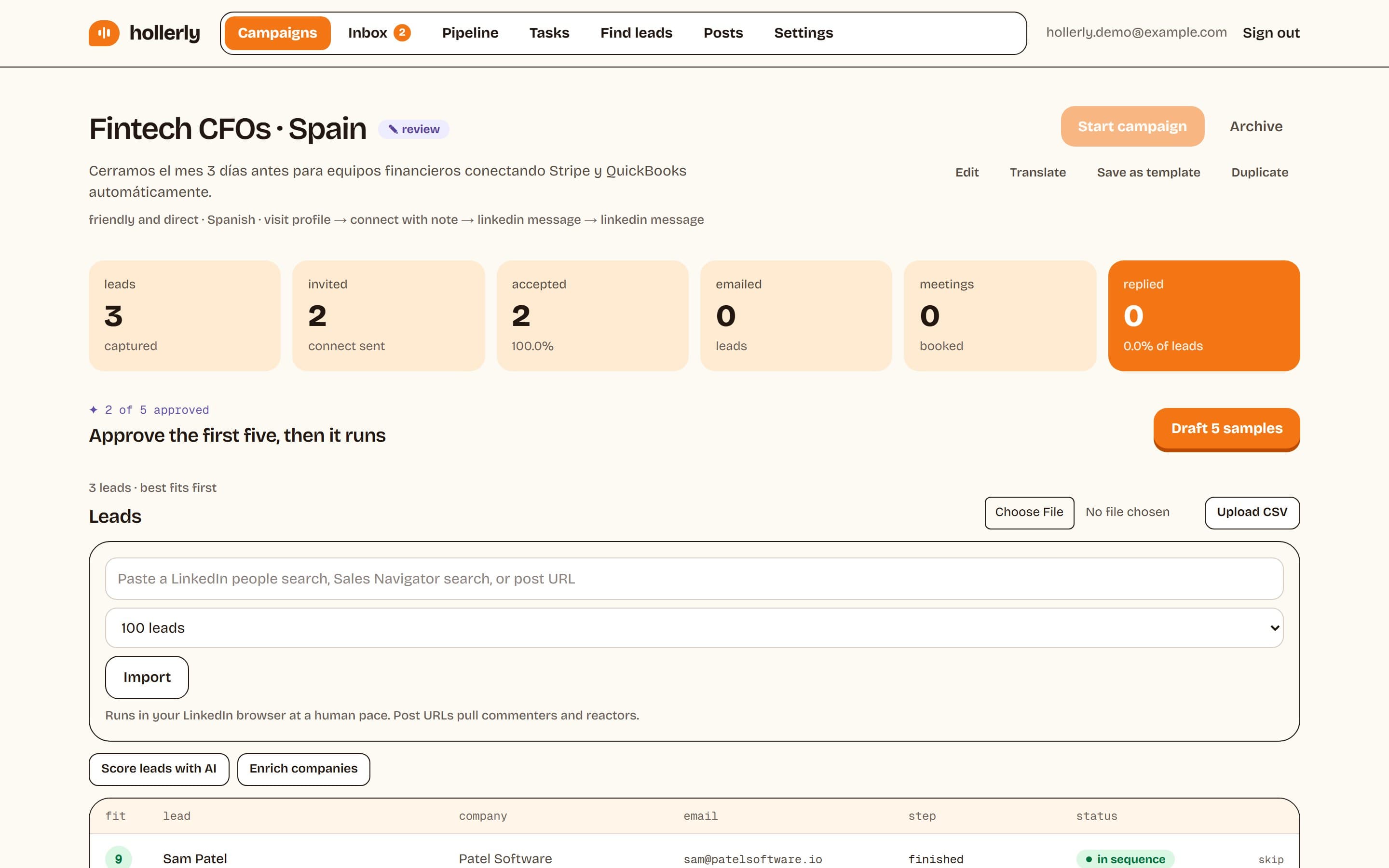
Hollerly costs more than Octopus CRM and about the same as Waalaxy's entry plan ($19 against €19), but it works differently. There is no extension. You connect your LinkedIn account once and Hollerly runs it from a dedicated cloud browser with its own IP in your country, so campaigns keep going with your laptop closed. Claude writes each note, message and email from the lead's profile, latest post and company website, and you approve the first five before it runs.
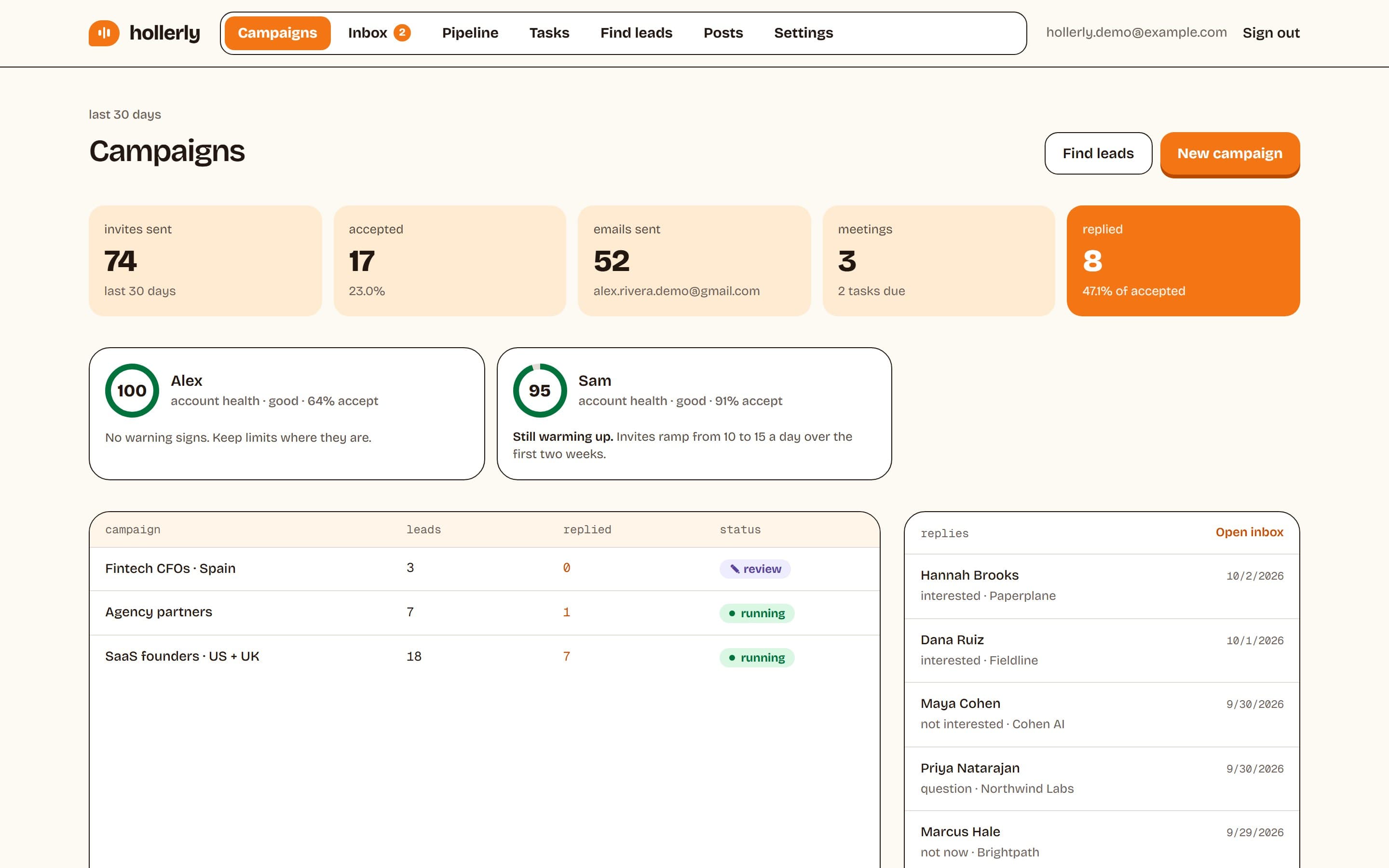
- Starter, $19 a month: 1 LinkedIn account, 300 connection requests a month, AI-written messages, unified inbox, lead scoring and safety caps.
- Pro, $49 a month: unlimited invites within LinkedIn's safe limits, email from your own Gmail, Outlook or SMTP mailbox, AI reply tagging and drafts, HubSpot and Pipedrive sync.
- Safety built in: up to 20 invites a day by default, working hours only, random gaps between actions and automatic pauses on warnings.
Where Hollerly is weaker: Octopus CRM is cheaper and lists automated endorsements. Hollerly has no B2B contact database, no email warmup, and no calls, SMS or WhatsApp, and as a newer product it has fewer integrations than older tools. Compare plans on the pricing page.
FAQ
+Is Octopus CRM cheaper than Waalaxy?
Yes. Octopus CRM runs from $9.99 to $39.99 a month, or $6.99 to $24.99 billed yearly. Waalaxy starts at €19 per user a month and goes up to €69 for the Business plan with cold email. Prices are from both vendors' sites, checked October 2, 2026.
+Is Octopus CRM a Chrome extension?
Yes. Octopus CRM runs as a Chrome extension in your browser, and it does not list a cloud option. Waalaxy also shows a Chrome Store listing. Cloud tools such as Hollerly work differently: they run your LinkedIn account from a remote browser, so campaigns continue when your laptop is closed.
+Does Waalaxy send cold emails?
Yes, on its Business plan at €69 per user a month. That plan adds cold email sequences and campaigns that mix LinkedIn and email steps. The Pro and Advanced plans include email finder credits but not email sequences. Octopus CRM does not list email sending on any plan.
+What is the main difference between Octopus CRM and Waalaxy?
Scope and price. Octopus CRM is a low-cost extension focused on LinkedIn actions such as invitations, bulk messages, profile visits and endorsements. Waalaxy costs more but adds ready-made sequences, an email finder, an API on Advanced and cold email on Business, so it suits people who expect to grow beyond LinkedIn.
+Which is safer, Octopus CRM or Waalaxy?
Neither vendor publishes enough to call a clear winner. Octopus CRM lists activity alerts and says it never asks for your LinkedIn login. Waalaxy lists human-like timing and monthly invite caps. Neither describes dedicated IPs. LinkedIn does not allow third-party automation, so keep daily volumes modest with any tool.
+Is there a cloud alternative to Octopus CRM and Waalaxy?
Yes. Hollerly runs each LinkedIn account in a dedicated cloud browser with its own IP in your country, so nothing needs installing. Starter costs $19 a month and Pro, with email from your own mailbox and AI reply drafts, costs $49. Pro has a 7-day free trial with no card.
Get replies without the busywork
Hollerly finds the people, writes every message with AI and follows up on LinkedIn and email until they reply. Runs in the cloud, from $19 a month.
Start my 7-day free trial