LinkedIn Lead Generation: The Complete Guide
LinkedIn lead generation is the work of turning people on LinkedIn into conversations with potential buyers. For B2B companies it's often the most direct channel there is: your buyers list their job title, company and responsibilities in public, and many of them read their LinkedIn messages.
This guide covers the whole system: what LinkedIn lead generation is, the five channels that produce leads, how to run a campaign step by step, what it really costs, how to turn replies into meetings, and the habits that separate steady pipelines from occasional luck. Each section links to a deeper guide when you want more detail.
What is LinkedIn lead generation?
Lead generation via LinkedIn means finding people who match your ideal customer, starting a relationship with them, and moving the right ones to a sales conversation. It's different from posting for reach or applying for jobs. The output is a list of people who said, in some form, "yes, let's talk".
There are two broad approaches, and most teams use both:
- Outbound: you choose the people and reach out with connection requests, messages, InMail or email.
- Inbound: people find you through your posts, profile, comments or ads, and come to you.
Outbound is predictable and fast to start. Inbound compounds slowly. The rest of this guide shows how to combine them.
LinkedIn B2B lead generation: the five channels
LinkedIn B2B lead generation runs through five channels. You don't need all five on day one.
1. Your profile
Every channel ends at your profile. Treat it as a landing page: a headline that says who you help and how, a banner that repeats it, an About section with one clear offer and a call to action, and a Featured section with a case study or resource.
2. Direct outreach
Connection requests with short notes, then messages and follow-ups. This is the workhorse for most B2B teams. Start with our connection request message templates and prospecting message templates.
3. Content
Posts that teach your buyers something specific. Content warms up the people you reach out to and brings in people you'd never have found. Our free LinkedIn post generator helps with first drafts, and the best time to post guide covers timing.
4. Engagement
Commenting thoughtfully on posts your buyers read. A good comment on a popular post in your niche can be seen by thousands of the right people. It also gives you a natural reason to connect.
5. Ads and Lead Gen Forms
LinkedIn's ad platform lets you target by job title, seniority, company size and industry, and its Lead Gen Forms pre-fill a form with the member's profile data. It's the fastest way to scale inbound, and the most expensive.
How to use LinkedIn for B2B lead generation, step by step
Step 1: Define your ideal customer
Write down role, seniority, company size, industry, region and one trigger that makes now a good time (new role, hiring, funding, a new product). If you can't name the trigger, your messages will be generic. Hollerly can draft this profile from your website with AI.
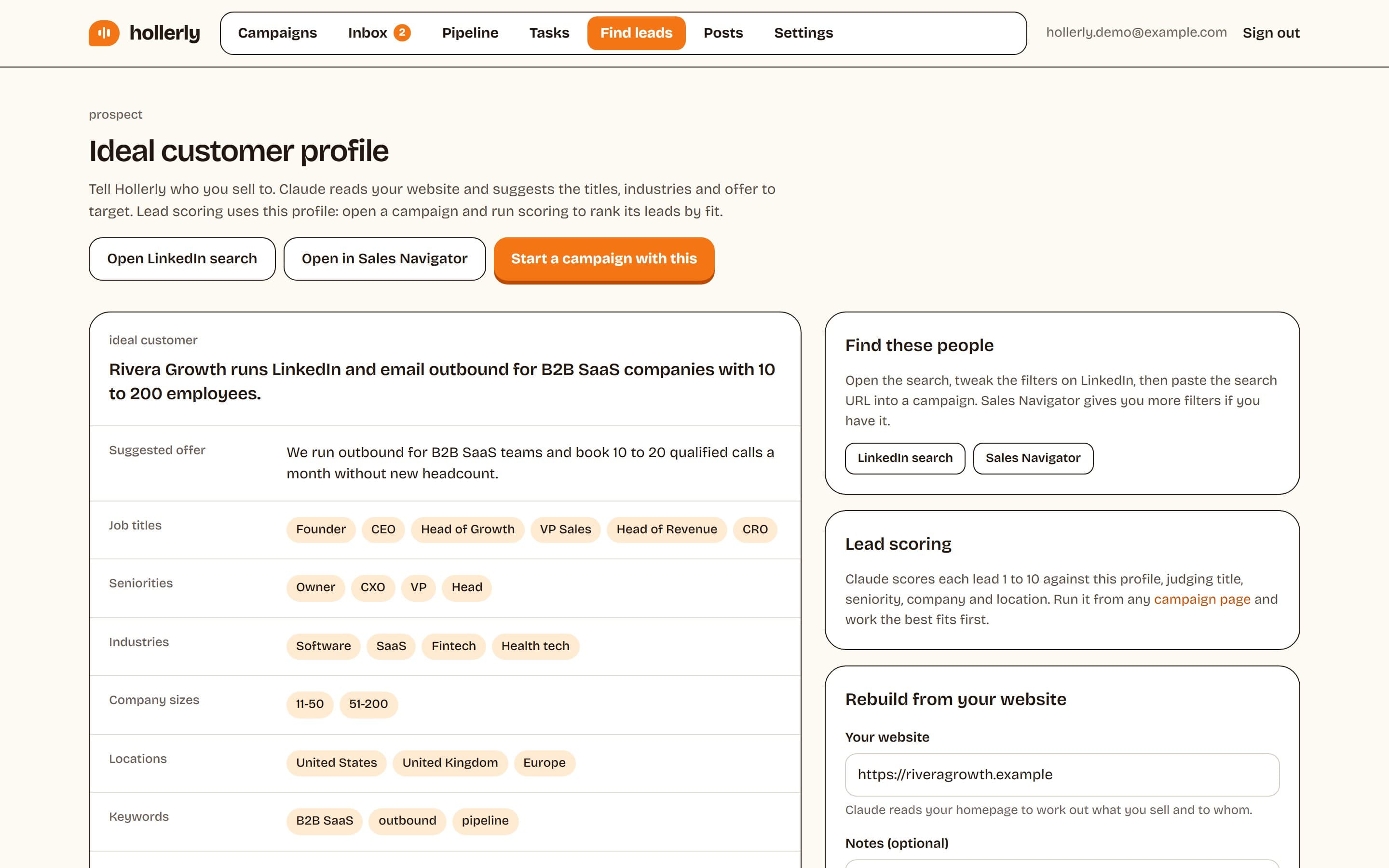
Step 2: Turn it into a search
Use LinkedIn's people search with boolean keywords, or Sales Navigator's filters for seniority, headcount and recent job changes. See what is LinkedIn Sales Navigator and whether it's worth the price.
Step 3: Warm up before you reach out
Follow your top prospects, read their recent posts and comment where you have something useful to add. A name they've seen once gets accepted more often.
Step 4: Connect with a reason
Send 15 to 20 connection requests a day with a short note that mentions something specific. Keep within LinkedIn's limits; see our connection request limit guide.
Step 5: Start conversations, not pitches
Message people a day after they accept with a question about their work. Follow up twice, adding something new each time. Our cold message guide has the structure.
Step 6: Hand off to email where it helps
People who don't accept can often be reached by work email. Find and verify their address, and send a short, related note from your own mailbox.
Step 7: Track and improve weekly
Measure acceptance rate, reply rate and positive reply rate per campaign. Change one thing at a time.
LinkedIn lead generation campaign: a worked example
Here's what a LinkedIn lead generation campaign looks like in practice, for an agency selling paid social services to e-commerce brands:
| Element | Example |
|---|---|
| Target | Founders and heads of marketing at e-commerce brands, 10 to 100 employees, UK |
| Trigger | Hiring a marketing role, or posted about ad costs in the last 30 days |
| List size | 300 people |
| Warm-up | Profile visit day 1, like a recent post day 2 |
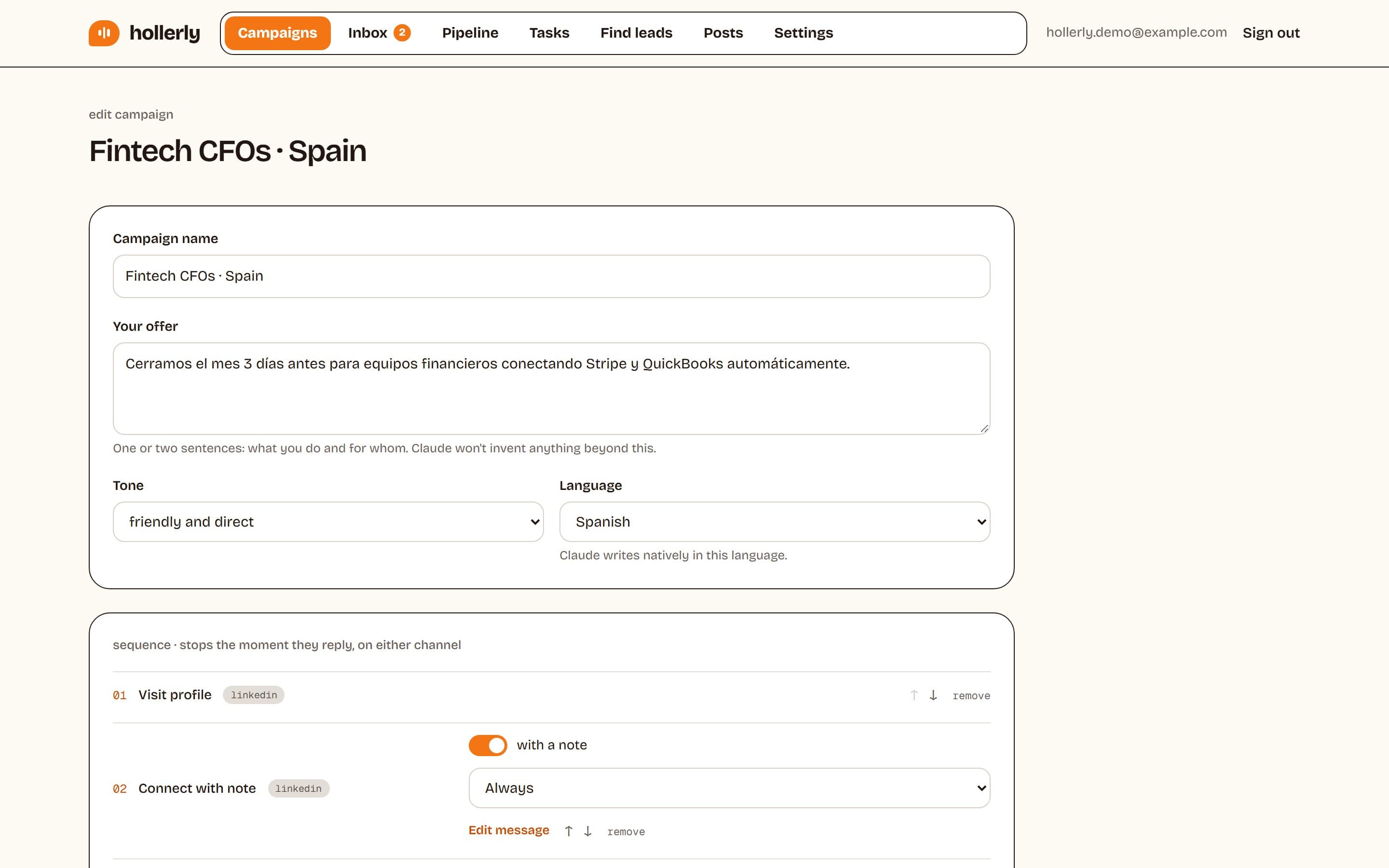
| Connection note | Mentions their store or their post, no pitch, under 200 characters |
| Message 1 | A question about how they handle creative testing today |
| Follow-up 1 | One specific idea from looking at their ads or site |
| Follow-up 2 | Close the loop with an easy "not now" option |
| Email branch | If not accepted after 7 days, a short email from the founder's mailbox |
| Pace | 20 invitations a day, weekdays, working hours |
Run the campaign for three weeks, then review. If acceptance is low, fix the list or the profile. If acceptance is fine but replies are low, fix the messages.
This is the flow Hollerly runs. It writes each note, message and email with AI from the lead's profile, latest post and company website, runs from the cloud inside safe daily limits, and stops when someone replies on either channel. Read more about LinkedIn lead generation with Hollerly.
LinkedIn lead generation cost
LinkedIn lead generation cost depends on how much you do by hand. Here are the main options, with prices we could verify on October 2, 2026:
| Approach | Software cost | Time cost |
|---|---|---|
| Manual, free LinkedIn account | $0 | High: 1 to 2 hours a day for steady volume |
| Manual with Sales Navigator Core | $89.99 to $119.99 a month | High, but better lists |
| Hollerly Starter (LinkedIn only) | $19 a month | Low: review lists and answer replies |
| Hollerly Pro (LinkedIn + email) | $49 a month | Low |
| LinkedIn Ads with Lead Gen Forms | Your ad budget | Medium: creative, targeting, follow-up |
| Agency or outsourced SDR | Usually a monthly retainer | Low for you, less control |
Whichever route you take, budget for the work that can't be automated: answering replies and running sales calls. The biggest cost is usually time, not software. An hour a day of manual prospecting is 20 hours a month. Compare that against the price of automation, and against the value of one new customer.
Estimating your cost per meeting
A simple way to compare approaches: add up software, ad spend and the value of your time for a month, then divide by the meetings booked. Run the numbers on your own campaigns rather than relying on someone else's averages, because results depend heavily on your market, offer and list. Do it again after three months. If one approach costs far more per meeting, shift time and budget toward the cheaper one and keep testing.
For ads, LinkedIn's Campaign Manager shows estimated costs for your audience before you spend. Costs vary widely by audience and competition, so test with a small budget first.
LinkedIn sales lead generation: from reply to meeting
LinkedIn sales lead generation isn't finished when someone replies. Plenty of pipelines leak between "interesting, tell me more" and a booked call.
- Reply fast. Within a few hours during working days. Interest fades quickly.
- Answer the question they asked before offering a call.
- Offer a specific, short next step: "15 minutes Thursday or Friday?" plus a booking link.
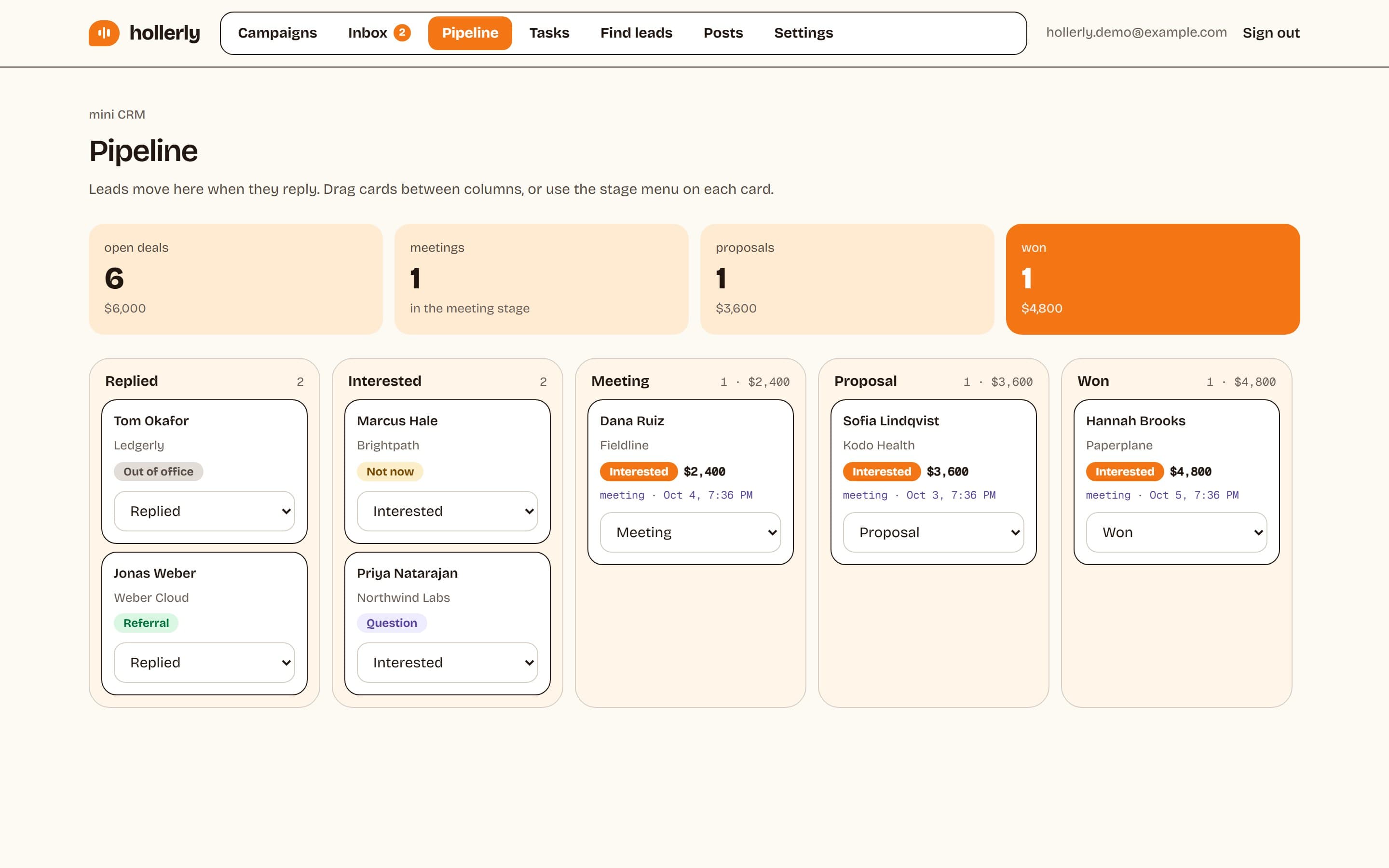
- Tag every reply: interested, question, not now, wrong person, unsubscribe. Each needs a different next step.
- Follow up on "not now" when they said to. Put it in a task, not your memory.
- Log it. Use your CRM or a simple pipeline board so nothing gets lost.
Hollerly puts LinkedIn and email replies in one inbox. On Pro, Claude tags each reply by intent and drafts an answer with your booking link, out-of-office replies pause the sequence until the person is back, and a pipeline board tracks deals. Calendly and Cal.com bookings are tracked too, with a short prep brief before each meeting.
LinkedIn lead generation tips
These LinkedIn lead generation tips come up again and again in campaigns that work:
- Narrow beats broad. A list of 300 well-chosen people outperforms 3,000 loose ones.
- Lead with a trigger. "Saw you're hiring two SDRs" beats "I came across your profile".
- Don't pitch in the connection note. Earn the conversation first.
- Keep messages short. Under 300 characters for first messages.
- Follow up twice, adding something new each time, then stop.
- Post at least weekly so prospects who check your profile see recent, useful activity.
- Comment before you connect with people who post.
- Withdraw stale invitations after three or four weeks.
- Respect limits: about 100 invitations a week. See our guide to a LinkedIn account restricted warning for what happens if you don't.
- Measure weekly and change one thing at a time.
LinkedIn B2B lead generation strategies by company type
| Company type | Strategy that usually fits |
|---|---|
| Founder-led startup | Founder posts weekly; founder's account runs outreach to a narrow list |
| Agency | Outreach from each partner's account, case-study content, client-specific campaigns |
| Sales team | Each rep runs their own territory list; shared templates; CRM sync |
| Consultant or freelancer | Content plus warm outreach to people who engage |
| Recruiter | InMail for senior candidates, connection requests for the rest |
Agencies can see how Hollerly handles multiple accounts and client reports on our agencies page.
Using LinkedIn groups and events for lead generation
Groups and events are quieter than the main feed, but they give you something valuable: shared context with strangers.
Groups
- Join three to five active groups where your buyers ask real questions. Skip groups full of promotions.
- Answer questions with specifics. No links to your site in the first few months.
- When a member engages with your answer, connect and mention the thread in your note.
- Treat group members as a warm list, not a broadcast audience.
Events
- People attending LinkedIn events and webinars in your niche share an interest with you, which makes your connection note easy to write.
- Connect before the event to say you'll be there, or after to follow up on something that was said.
- Hosting your own event, even a small one, gives you a list of people who raised their hand.
Common LinkedIn lead generation mistakes
| Mistake | What happens | Fix |
|---|---|---|
| Targeting "decision makers" broadly | Low acceptance, generic messages | One role, one company type, one trigger per campaign |
| Pitching in the connection note | Declines and "I don't know this person" reports | Earn the conversation first |
| No follow-up | Most replies never happen | Two follow-ups, each adding something new |
| Bursts of activity | Invitation limits and restrictions | Steady daily pace in working hours |
| A profile written for recruiters | Prospects don't see why to reply | Headline and About aimed at buyers |
| Slow replies to interest | Leads go cold | Answer within hours on working days |
| No tracking | Same mistakes repeat | Weekly acceptance and reply rates per campaign |
For benchmarks on acceptance and reply rates across real campaigns, see Hollerly's data studies.
Automating LinkedIn lead generation
Once the process works by hand, automation keeps it running every day. Our step-by-step guide on how to automate LinkedIn outreach covers the setup, and our roundup of the best LinkedIn automation tools compares the options.
Be clear on the risk: LinkedIn's User Agreement doesn't allow automation tools, and accounts can be restricted. Conservative limits, working hours and a tool that pauses at the first warning reduce that risk. Nothing removes it.
Hollerly is built for this: AI-written messages for every lead, LinkedIn and email from your own mailbox, an AI inbox, and safety defaults that keep you inside LinkedIn's limits. Plans start at $19 a month. See pricing or the Hollerly home page.
FAQ
+What is LinkedIn lead generation?
LinkedIn lead generation is the process of finding potential buyers on LinkedIn, starting conversations with them and moving interested people to a sales call. It combines outbound work, like connection requests and messages, with inbound work, like posts, comments, your profile and LinkedIn ads with Lead Gen Forms.
+How to use LinkedIn for B2B lead generation?
Define your ideal customer, build a LinkedIn or Sales Navigator search for them, and warm them up by following and engaging with their posts. Send connection requests with short, specific notes, start conversations with questions, follow up twice, and use email for people who don't accept. Track acceptance and reply rates weekly.
+How to use LinkedIn groups for lead generation?
Join a few active groups where your buyers ask questions. Answer helpfully without pitching, share useful resources, and connect with members who engage with you, mentioning the group in your note. Groups work best as a warm-up and a source of context, not as a place to post promotions.
+How much does LinkedIn lead generation cost?
It can cost nothing but time if you work manually on a free account. Sales Navigator Core is $89.99 to $119.99 a month. Automation tools like Hollerly start at $19 a month. LinkedIn Ads cost whatever budget you set, and costs per lead vary widely by audience.
Get replies without the busywork
Hollerly finds the people, writes every message with AI and follows up on LinkedIn and email until they reply. Runs in the cloud, from $19 a month.
Start my 7-day free trial